A
B
C
Friday, March 15, 2013

JQuery - Hide a group of elements
Use the following example to hide a group of elements when a check box is click it using JQuery.
Tmp ones
Please hide me!!!!
Thursday, February 14, 2013
Suspect Database in SQL Server
If your database is in suspect mode there are several possible reasons:
1. You do not have enough space available so the SQL Server can recover the database during startup
2. Your Database might be corrupted
3. Maybe there is no enough memory
4. Possible hardware failure.
5. The Database files are held by other programs
To try to solve this problem following the next steps, but before I encourage you to make a copy of your database file, because in the process you could loss some data and there is no way to go back to the previous state.
STEP 1.- Put the database in EMERGENCY mode so you can manipulate the database
USE master
GO

ALTER DATABASE mydb SET EMERGENCY
GO
STEP 2.- Put the database in single user mode, so nobody can interfere with the process
ALTER DATABASE mydb SET SINGLE_USER WITH ROLLBACK IMMEDIATE
GO
STEP 3.- Try to repair the data base
DBCC CHECKDB (mydb, REPAIR_ALLOW_DATA_LOSS)
GO
STEP 4.- Return the database to a multi user so it can be accessed
ALTER DATABASE mydb SET MULTI_USER
GO
Now you database should be ready to be used; check the logs so you can fix any problems found.
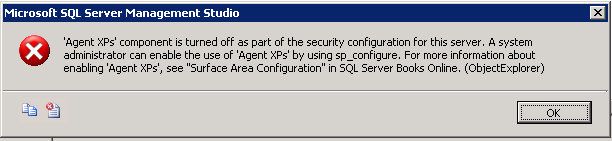
Agent xps component is turned off as part of the security configuration for this server
You are going to get this error on SQL 2005 is you are trying to create a maintenance plan; the problem is that your SQL Server Agent is not running, which menas is set to run manually, so you have to change it to start automatically, so all you have to do is follow the next simple steps:
1.- Open the SQL Server Surface Area Configuration
2.- Select the Surface Area Configuration for Services and Connections
3.- Expand the SQL Server Agent
4.- On Service, change the Startup type to Automatic
5.- Click Start button
6.- Click the OK button
Now you are ready to create your maintenance plan.
1.- Open the SQL Server Surface Area Configuration
2.- Select the Surface Area Configuration for Services and Connections
3.- Expand the SQL Server Agent
4.- On Service, change the Startup type to Automatic
5.- Click Start button
6.- Click the OK button
Now you are ready to create your maintenance plan.
Wednesday, February 6, 2013
Android Emulator is not working
Some people think the emulator of Android is not working because it shows only the Android text.
The problem is not a problem, all you have to do is wait,because the emulator takes a long time to load the first time, several minutes, and in this time only shows 'Android' in large text.
You need to wait a couple of minutes and then you should be fine, this waiting time is going to depend on your computer processor and memory Ram.

The problem is not a problem, all you have to do is wait,because the emulator takes a long time to load the first time, several minutes, and in this time only shows 'Android' in large text.
You need to wait a couple of minutes and then you should be fine, this waiting time is going to depend on your computer processor and memory Ram.

Wednesday, January 30, 2013
How to make Android's browser load desktop instead of mobile web sites
If you want your android's device (Phone or tablet), with jellybeans, honeycomb, etc, load full web pages instead of the mobile version, do the next steps:
1. Open the browser on your device
2. In the address bar, type: about:debug then press enter
3. Open the browser's settings (the icon in the top-right corner, it looks like four horizontal lines) then selecting "Settings" from the drop-down menu
4. Select the Debug section
5. On the right side of the screen, select UAString then select Desktop as the new option
6. To exit the debug mode in the browser, press the back button in your device
7. In the browser's address bar, type again "about:debug" then click enter
Now your device is ready to display full web pages, instead of mobile ones.

1. Open the browser on your device
2. In the address bar, type: about:debug then press enter
3. Open the browser's settings (the icon in the top-right corner, it looks like four horizontal lines) then selecting "Settings" from the drop-down menu
4. Select the Debug section
5. On the right side of the screen, select UAString then select Desktop as the new option
6. To exit the debug mode in the browser, press the back button in your device
7. In the browser's address bar, type again "about:debug" then click enter
Now your device is ready to display full web pages, instead of mobile ones.

Thursday, January 24, 2013
The connection to adb is down, and a severe error has occured
If you get the error in Eclipse:
"The connection to adb is down, and a severe error has occured"
When trying to debug your application in your device, that means the adb server was not initialized right, to solve this problem, do the next steps:- Be sure Eclipse is not running
- Open the command prompt in the Android SDK platform-tools directory
- Type the command: adb kill-server, to stop the server
- Restart the server with the command: adb start-server
- Start Eclipse
Now you should be able to test you app in your device
Subscribe to:
Posts (Atom)