Showing posts with label Programming C#. Show all posts

Thursday, November 19, 2015

How to map network drives programmatically in C#


Follow the next example to map a network drive programmatically:

// Map Network drive
System.Diagnostics.Process process = new System.Diagnostics.Process();
System.Diagnostics.ProcessStartInfo psi = new System.Diagnostics.ProcessStartInfo();

// Notes:
//      Use /C To carry out the command specified by string and then terminates
//      You can omit the passord or username and password
//      Use /PERSISTENT:YES to keep the mapping when the machine is restarted
psi.FileName      = "cmd.exe";
psi.Arguments     = @"/C net use X: \\MyServer\Folder01  /USER:MyDomain\MyUsername MyPassword /PERSISTENT:YES";
psi.WindowStyle   = System.Diagnostics.ProcessWindowStyle.Normal;
process.StartInfo = psi;

process.Start();


Tuesday, November 17, 2015

c# windows application, Error creating window handle (Win32 Exception) or red square with X across


If you are developing a windows application and you get an error like this one:

Application: Tool.exe Framework Version: v4.0.30319 Description: The process was terminated due to an unhandled exception. Exception Info: System.OutOfMemoryException Stack: at System.Drawing.Graphics.FromHdcInternal(IntPtr) at System.Drawing.Font.GetHeight() at System.Drawing.Font.get_Height() at System.Windows.Forms.Control.get_FontHeight() at System.Windows.Forms.TextBoxBase.get_PreferredHeight() at System.Windows.Forms.TextBoxBase.get_DefaultSize() at System.Windows.Forms.Control..ctor(Boolean) at System.Windows.Forms.TextBoxBase..ctor() at System.Windows.Forms.TextBox..ctor() at System.Windows.Forms.ThreadExceptionDialog..ctor(System.Exception) at System.Windows.Forms.Application+ThreadContext.OnThreadException(System.Exception) at System.Windows.Forms.Control.WndProcException(System.Exception) at System.Windows.Forms.Control+ControlNativeWindow.OnThreadException(System.Exception) at System.Windows.Forms.NativeWindow.Callback(IntPtr, Int32, IntPtr, IntPtr) at System.Windows.Forms.UnsafeNativeMethods.DispatchMessageW(MSG ByRef) at System.Windows.Forms.Application+ComponentManager.System.Windows.Forms.UnsafeNativeMethods.IMsoComponentManager.FPushMessageLoop(IntPtr, Int32, Int32) at System.Windows.Forms.Application+ThreadContext.RunMessageLoopInner(Int32, System.Windows.Forms.ApplicationContext) at System.Windows.Forms.Application+ThreadContext.RunMessageLoop(Int32, System.Windows.Forms.ApplicationContext) at System.Windows.Forms.Application.Run(System.Windows.Forms.Form) at Tool.Program.Main() 

It is because there is a leak of memory in your program, some objects are not released, usually is because you are building controls dynamically.
This program will generate others like a red square with an X inside:


To identify what is the root of the problem do this:

-Run Process Explorer or the Windows Task Manager to look at the GDI Objects, Handlers, Threads and USERS objects, run your application and see which column is growing really large.
The windows handle limit for your application is 10,000 handles, you can increase this value in the registry but is not the best solution:
HKEY_LOCAL_MACHINE\SOFTWARE\Microsoft\Windows NT\CurrentVersion\Windows\USERProcessHandleQuota

The other limit you have is 66,536 user handles per Windows session and 11,000 for GDI Objects depending on the system.

- Use the application Bear, it shows resource usage of all GDI objects & user objects, and handle count, it is a great tool to identify memory leaks.


- Use the Desktop Heap Monitor to see your limits

-On Visual Studio break all the exceptions (Control/Alt + E) then check the Common Language Run-time Exceptions, in order to get all the exceptions


Solutions:
-Dispose you objects manually, here you have a good article about it.
-Reuse components specially  the GDI Objects; for example if you are creating dynamically objects like ToolTip, they stay in memory, they don't get disposed.


Wednesday, November 4, 2015

How to connect to SQL database inside of Script Task in SSIS using C#


This example shows how to execute a store procedure inside of a SSIS Script Task:

// Get the connection from the Dts package
Microsoft.SqlServer.Dts.Runtime.ConnectionManager cm = Dts.Connections["connectionManaget1"];

// Create the connection
System.Data.SqlClient.SqlConnection sqlConn = (System.Data.SqlClient.SqlConnection)cm.AcquireConnection(Dts.Transaction);

// Create the command with the connection
System.Data.SqlClient.SqlCommand sqlComm = new System.Data.SqlClient.SqlCommand("EXEC dbo.MyStoreProcedure @var = 1", sqlConn);

// Execute the command
sqlComm.ExecuteNonQuery();

// Release the connection
cm.ReleaseConnection(sqlConn);

Tuesday, July 17, 2012

Controls dynamically added in ASP.NET are lost after a postback

If you are loosing your controls added dynamically to a web page after a full or partial postback, is because you are not creating them in the Page.Init.

According to the ASP.NET Page Life Cycle, PostData (all values inputed on the client side) is applied between the Page.Init and Page.Load, so, if you add a control in the Page.Init, they will not lose their state and you don't have to recreate them.


        protected void Page_Init()
        {

        Control ct = ParseControl("");

        Page.Controls.add(ct);

        }


TemplateControl.ParseControl the easy way to add controls

The TemplateControl.ParseControl() is a powerfull tool to convert a string into a control, if you want to add controls to your web page this object will help you avoid a lot of coding.


// Create the label control
Control ct = ParseControl("");

// Add the control to the page
Page.Controls.Add(ct);

//
// Create a string with a table and a label
string tbl = "b
Text
"; // Create the control Control ctrl = Page.ParseControl(tbl); // Add it to the page PageControls.Add(ctrl);

Monday, April 9, 2012

Split string with more than one char as delimiter


To split an string with a delimiter with more than one character like;
This is my list \r\nOranges \r\nApples \r\nGrapes
you can use:


//

string[] sArray = System.Text.RegularExpressions.Regex.Split(value, "\r\n");

//


Another option that works faster is:


//

char[] delimiters = new char[] { '\r', '\n' };
string[] sArray = MyString.Split(delimiters, StringSplitOptions.RemoveEmptyEntries);

//

Tuesday, March 29, 2011

How to get nested tags using Linq To XML query

Let's say we have the next XML:


This is a link example


        Text...
        Text...
        text...
        Text...
        Text...
      
      
        Text
        Text
        Text
      
      
        Info
        Info
        Info
        Info


And you want to get the tags inside on the chapter number two.
You can use this code:
// Load the document
XDocument loadedData = XDocument.Load("kjv.xml");

// Get the testament
IEnumerable<xelement> xmlTestament = loadedData.Descendants("testament").Where(c => ((string)c.Attribute("name")).Equals("New"));

// Get the book
IEnumerable<xelement> xmlBook      = xmlTestament.Descendants("book").Where(c => ((string)c.Attribute("name")).Equals("Matthew"));

// Get the chapter
IEnumerable<xelement> xmlChapter = xmlBook.Descendants("chapter").Where(c => ((string)c.Attribute("number")).Equals("2"));

foreach (string s in xmlChapter.Descendants("verse"))
{
  listBox1.Items.Add(s);
}

// -----------------------------------------------------------------------------------------


This is another way to get the info needed
//
// Load the document
XDocument loadedData = XDocument.Load("kjv.xml");

// Get the info
IEnumerable<XElement> data1 = from query in loadedData.Descendants("testament")
                                             where (string)query.Attribute("name").Value == "New"
                                        from book in loadedData.Descendants("book")
                                             where (string)book.Attribute("name").Value == "Matthew"
                                        from chap in loadedData.Descendants("chapter")
                                             where (string)chap.Attribute("number").Value == "2"
                                        select chap;

foreach (string s in data1.Descendants("verse"))
{
   listBox1.Items.Add(s);
}


//-----------------------------------------------------------------------------------


Monday, January 31, 2011

Calculating Date Difference in C#

In this example we show two ways to calculate the difference between two dates:

            System.DateTime dt1 = new System.DateTime(2011, 1, 31, 12, 0, 0);

            System.DateTime dt2 = new System.DateTime(2011, 2, 30, 12, 0, 0);

            // Option One
            System.TimeSpan diff = dt1  - dt2;

            // Option two
            System.TimeSpan diff = dt1.Subtract(dt2);

            Console.WriteLine("Diff in days " + diff.Days);

            Console.WriteLine("Diff in total days " + diff.TotalDays);

            Console.WriteLine("Diff in hours " + diff.Hours);

            Console.WriteLine("Diff in minutes " + diff.Minutes);

            Console.WriteLine("Diff in seconds" + diff.Seconds);

Friday, January 14, 2011

Controls for windows mobile 6.x

This is a list of some available controls for windows mobile 6.x

Fluid – Windows Mobile 6.x Touch Controls
Fluid is a .NET 2.0 control library for Windows Mobile 6.0/6.1 with touch controls.
Price
Free, open source.
Image

Code example
private void Form1_Load(object sender, EventArgs e)
{
    //Main Panel
    FluidPanel mainPanel = new FluidPanel();
    mainPanel.Bounds = new Rectangle(0, 0, 240, 300);
    mainPanel.BackColor = Color.Red;
    mainPanel.GradientFill = true;
    mainPanel.GradientFillOffset = 30;
    mainPanel.ForeColor = Color.White;
    mainPanel.ShowMaximized();
    fluidHost1.Add(mainPanel);

    //Label
    FluidLabel h1 = new FluidLabel("Fluid サンプル", 0, 0, 240, 40);
    h1.ShadowColor = Color.Black;
    h1.ForeColor = Color.White;
    h1.Alignment = StringAlignment.Center;
    h1.LineAlignment = StringAlignment.Center;
    h1.Font = new Font(FontFamily.GenericSansSerif, 12f, FontStyle.Bold);
    h1.Anchor = FluidControl.AnchorTLR;
    fluidHost1.Add(h1);

    //
    FluidButton okBtn = new FluidButton("OK", 70, 200 - 40, 100, 32);
    okBtn.BackColor = Color.Black;
    //okBtn.Click += new EventHandler(okBtn_Click);
    okBtn.ForeColor = Color.White;
    okBtn.Anchor = FluidControl.AnchorBL;
    fluidHost1.Add(okBtn);
}


Home site
http://fluid.codeplex.com/


Windows Mobile Password Safe
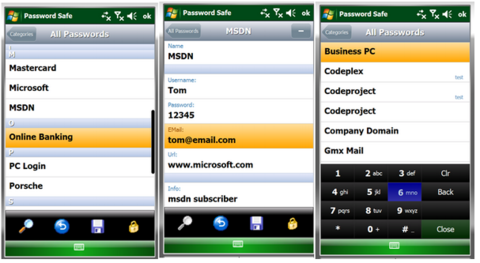
Password Safe is a .NET 2.0 Mobile application that allows you to keep your passwords in your mobile secured with the top secure AES encryption. It provides a nice touch surface with gestures, and can be completely used without a stylus, except when you're writing or editing new passwords.
Price
Free, open source
Image

Code example
void delPasswordButton_Click(object sender, EventArgs e)
{
    passwordToRemove = passwordsListBox.SelectedPassword;
    if (passwordToRemove != null)
    {
        MessageDialog dialog = new MessageDialog();
        dialog.Message = "Delete Password?";
        dialog.Result += new EventHandler(dialog_Result);
        dialog.ShowModal(ShowTransition.FromBottom); 
    }
} 

void dialog_Result(object sender, Fluid.Classes.DialogEventArgs e)
{
    switch (e.Result)
    {
        case System.Windows.Forms.DialogResult.OK:
            ListBuilder.Instance.DeletePassword(passwordToRemove);
            UpdatePasswords();
            this.GoBack();
            break;
    }
} 

Home site
http://www.codeproject.com/KB/windows/MobilePasswordSafe.aspx


Touch Controls Suite 2
Touch Controls Suite 2 is the leading touch UI component suite that allows software developers to create graphically stunning, highly intuitive touch screen user interfaces for Windows Mobile Smartphone applications that are based on the Microsoft .NET Compact Framework (.NETCF).
Price
$99.00
Image
Source example
private void loadList(AnimationDirection ad, AnimationType at)
        {
            //XmlNodeList lName = root.GetElementsByTagName("name");
            //XmlNodeList lDesc = root.GetElementsByTagName("desc");
            //TreeNode RootNode = new TreeNode();

            touchListBox1.PrepareAnimation();
            touchListBox1.Items.Clear();
            touchListBox1.BackColor = System.Drawing.SystemColors.InactiveCaption; //System.Drawing.SystemColors.ControlDark;

            //for (int i = 0; i < lName.Count; i++)
            for (int i = 0; i < root.ChildNodes.Count; i++ )
            {
                TouchListDefaultItem di = getItemList(root.ChildNodes[i]["name"].InnerText, root.ChildNodes[i]["desc"].InnerText, i);
                touchListBox1.Items.Add(di);

                TouchListHeaderItem hi = getItemSpacer();
                touchListBox1.Items.Add(hi);
            }

            //animationType = AnimationType.atSlide;

            //touchListBox1.Refresh();
            touchListBox1.UpdateList();  // (AnimationDirection.adLeft);  //(false); //(ad, at, false);
        }
Home site
http://www.mirabyte.com/en/products/touch-controls-suite/

Smart Device Framework
The Smart Device Framework is aimed at developers wanting to simplify and reduce the cost of their development experience using the .NET Compact Framework. By providing useful extensions the core .NET Compact Framework class libraries, the Smart Device Framework enables developers to concentrate on building core application functionality.
Price
Free / $50 / $500
Image
Home site
http://opennetcf.com/CompactFramework/Products/SmartDeviceFramework/tabid/65/Default.aspx

XML Programatically make xml tags look aligned

The next code is useful for making your XML tags a little more readable by aligning the tags.


public static String xmlAligned(String Xml)
        {
            String Result = Xml;
            if (Xml.Length != 0)
            {
                try
                {
                    // Load the XmlDocument with the XML variable
                    XmlDocument D = new XmlDocument();
                    D.LoadXml(Xml);
                    MemoryStream MS = new MemoryStream();
                    XmlTextWriter W = new XmlTextWriter(MS, System.Text.Encoding.Unicode);

                    // Format the XML document
                    W.Formatting = Formatting.Indented;

                    // Write the Xml into a formatting XmlTextWriter
                    D.WriteContentTo(W);
                    W.Flush();
                    MS.Flush();

                    // Rewind the MemoryStream in order to read its contents.
                    MS.Position = 0;

                    // Read MemoryStream contents
                    StreamReader SR = new StreamReader(MS);

                    // Get the text
                    String FormattedXml = SR.ReadToEnd();

                    // Get the results
                    Result = FormattedXml;

                    try
                    {
                        // Close all the resources used
                        MS.Close();
                        MS = null;
                        W.Close();
                        W = null;
                    }
                    catch { }
                }
                catch { }
            }

            // Return the aligned XML
            return Result;
        }


Thursday, January 13, 2011

GridView.RowDataBound the last opportunity to access the data item

Before the GridView control can be rendered, each row in the control must be bound to a record in the data source. The RowDataBound event is raised when a data row (represented by a GridViewRow object) is bound to data in the GridView control. This enables you to provide an event-handling method that performs a custom routine, such as modifying the values of the data bound to the row, whenever this event occurs.

A GridViewRowEventArgs object is passed to the event-handling method, which enables you to access the properties of the row being bound. To access a specific cell in the row, use the Cells property of the GridViewRow object contained in the Row property of the GridViewRowEventArgs object. You can determine which row type (header row, data row, and so on) is being bound by using the RowType property.

void CustomersGridView_RowDataBound(Object sender, GridViewRowEventArgs e)
  {

    if(e.Row.RowType == DataControlRowType.DataRow)
    {
      // Display the company name in italics.
      e.Row.Cells[1].Text = "" + e.Row.Cells[1].Text + "";

    }

  }

GridView.RowDataBound the last opportunity to access the data item

Before the GridView control can be rendered, each row in the control must be bound to a record in the data source. The RowDataBound event is raised when a data row (represented by a GridViewRow object) is bound to data in the GridView control. This enables you to provide an event-handling method that performs a custom routine, such as modifying the values of the data bound to the row, whenever this event occurs.

A GridViewRowEventArgs object is passed to the event-handling method, which enables you to access the properties of the row being bound. To access a specific cell in the row, use the Cells property of the GridViewRow object contained in the Row property of the GridViewRowEventArgs object. You can determine which row type (header row, data row, and so on) is being bound by using the RowType property.

void CustomersGridView_RowDataBound(Object sender, GridViewRowEventArgs e)
  {

    if(e.Row.RowType == DataControlRowType.DataRow)
    {
      // Display the company name in italics.
      e.Row.Cells[1].Text = "" + e.Row.Cells[1].Text + "";

    }

  }

Source:
http://msdn.microsoft.com/en-us/library/system.web.ui.webcontrols.gridview.rowdatabound.aspx

Tuesday, January 11, 2011

TreeView.ImageIndex is not keeping the image

Problem:
I want to keep the original image when a node is selected on the TreeView, but whenever a node is selected, it's image changes.

Solution:
You should set a node's ImageIndex so it will stay there. TreeView::SelectedImageIndex is a specific image that is used when a node is the selected node. For example, maybe you have a folder icon for all unselected nodes, but when you have a node selected you want that folder to look like an "open" folder. That is where you can use the SelectedImageIndex.

Tuesday, December 21, 2010

How to create a GUID in C#

GUID (Globally unique identifier) is a 128-bit integer that can be used to uniquely identify something.
You may store users or products in your database and you want somehow uniquely identify each row in the database.
A common approach is to create a autoincrementing integer, another way would be to create a GUID for your products.
The GUID method can be found in the System namespace. The GUID method System.Guid.NewGuid() initializes a new instance of the GUID class.


Response.Write(@"
System.Guid.NewGuid().ToString() = " + System.Guid.NewGuid().ToString());


Response.Write(@"
System.Guid.NewGuid().ToString(""N"") = " + System.Guid.NewGuid().ToString("N"));

Response.Write(@"
System.Guid.NewGuid().ToString(""D"") = " + System.Guid.NewGuid().ToString("D"));

Response.Write(@"
System.Guid.NewGuid().ToString(""B"") = " + System.Guid.NewGuid().ToString("B"));

Response.Write(@"
System.Guid.NewGuid().ToString(""P"") = " + System.Guid.NewGuid().ToString("P"));

Friday, December 17, 2010

Programmatically opening a file in its native program

OpenFileDialog ofd = new OpenFileDialog();


if (ofd.ShowDialog() == DialogResult.OK)

                  System.Diagnostics.Process.Start(ofd.FileName);

Tuesday, August 31, 2010

Format System.DateTime in .NET


System.DateTime in ASP.NET


Below are common uses of the DateTime Structure in C#


DateTime.Now; 8/31/2010 12:25:09 PM
DateTime.Now.ToString(); 8/31/2010 12:25:09 PM
DateTime.Now.ToShortTimeString()12:25 PM
DateTime.Now.ToShortDateString()8/31/2010
DateTime.Now.ToLongTimeString()12:25:09 PM
DateTime.Now.ToLongDateString()Tuesday, August 31, 2010


DateTime.Now.ToString("d")8/31/2010
DateTime.Now.ToString("D")Tuesday, August 31, 2010
DateTime.Now.ToString("f")Tuesday, August 31, 2010 12:25 PM
DateTime.Now.ToString("F")Tuesday, August 31, 2010 12:25:09 PM
DateTime.Now.ToString("g")8/31/2010 12:25 PM
DateTime.Now.ToString("G")8/31/2010 12:25:09 PM
DateTime.Now.ToString("m")August 31
DateTime.Now.ToString("r")Tue, 31 Aug 2010 12:25:09 GMT
DateTime.Now.ToString("s")2010-08-31T12:25:09
DateTime.Now.ToString("t")12:25 PM
DateTime.Now.ToString("T")12:25:09 PM
DateTime.Now.ToString("u")2010-08-31 12:25:09Z
DateTime.Now.ToString("U")Tuesday, August 31, 2010 5:25:09 PM
DateTime.Now.ToString("y")August, 2010
DateTime.Now.ToString("dddd, MMMM dd yyyy")Tuesday, August 31 2010
DateTime.Now.ToString("ddd, MMM d "'"yy")Tue, Aug 31 '10
DateTime.Now.ToString("dddd, MMMM dd")Tuesday, August 31
DateTime.Now.ToString("M/yy")8/10
DateTime.Now.ToString("dd-MM-yy")31-08-10


Source: http://www.csharpfriends.com/demos/system.datetime.aspx


Wednesday, August 25, 2010

How to use mySQL with .Net

Add mySQL connector
In order to use mySQL with .Net you need to download the connector from the next web site:

http://dev.mysql.com/downloads/connector/net/


Add mySQL connector to your project
On your project right click on "References" ans select "Add Reference..."
Browse to the folder where you installed the connector and open the folder "Assemblies"
Add the MySql dlls

Use connector en your code
Now you can use the connector in your code to access mySQL database


using System;
using System.Configuration;
using System.Data.SqlClient;
using System.Data;
using MySql.Data;
using MySql.Data.MySqlClient;

namespace mySQLExample
{
///
/// Summary description for dbConnection.
///

public class dbConnection
{
private string connectionString;

public dbConnection()
{
connectionString = "Server=MySqlServer;Database=MySqlDB;Uid=MySqlUser;Pwd=MySQLPsw;Port=3306;old guids=true";
}


public DataSet ExecuteQuery(CommandType cmdType, string cmdText, params System.Data.Common.DbParameter[] cmdParms)
{
using (MySqlConnection conn = new MySqlConnection(connectionString))
{
using (MySqlCommand cmd = new MySqlCommand())
{
PrepareCommand(cmd, conn, null, cmdType, cmdText, cmdParms);
using (MySqlDataAdapter da = new MySqlDataAdapter(cmd))
{
DataSet ds = new DataSet();
da.Fill(ds, "dataset");
cmd.Parameters.Clear();
return ds;
}
}
}
}

public int ExecuteNonQuery(CommandType cmdType, string cmdText, params System.Data.Common.DbParameter[] cmdParms)
{
MySqlCommand cmd = new MySqlCommand();

using (MySqlConnection conn = new MySqlConnection(connectionString))
{
PrepareCommand(cmd, conn, null, cmdType, cmdText, cmdParms);
int val = cmd.ExecuteNonQuery();
cmd.Parameters.Clear();
return val;
}
}

private static void PrepareCommand(System.Data.Common.DbCommand cmd, System.Data.Common.DbConnection conn, System.Data.Common.DbTransaction trans, CommandType cmdType, string cmdText, System.Data.Common.DbParameter[] cmdParms)
{
if (conn.State != ConnectionState.Open) conn.Open();

cmd.Connection = conn;
cmd.CommandText = cmdText.Replace("@", "?").Replace(":", "?");

if (trans != null) cmd.Transaction = trans;

cmd.CommandType = cmdType;

if (cmdParms != null)
{
foreach (MySqlParameter parm in cmdParms)
{
parm.ParameterName = parm.ParameterName.Replace("@", "?").Replace(":", "?");
cmd.Parameters.Add(parm);
}
}
}

}
}


C# and mySQL error: Guid should contain 32 digits with 4 dashes (xxxxxxxx-xxxx-xxxx-xxxx-xxxxxxxxxxxx)


Problem:
When working with C# and mySQL, I use the code below I get the error message "Guid should contain 32 digits with 4 dashes (xxxxxxxx-xxxx-xxxx-xxxx-xxxxxxxxxxxx)"


       public DataSet ExecuteQuery(System.Data.Common.DbTransaction trans, CommandType cmdType, string cmdText,
           params System.Data.Common.DbParameter[] cmdParms)
       {
           MySqlCommand cmd = new MySqlCommand();

           PrepareCommand(cmd, trans.Connection, trans, cmdType, cmdText, cmdParms);

           MySqlDataAdapter da = new MySqlDataAdapter(cmd);

           DataSet ds = new DataSet();

           da.Fill(ds, "ds");

           cmd.Parameters.Clear();

           return ds;
       }


Cause:
The problem is that the the guids are being returned as varbinary(16) instead of binary(16) and as a result nhibernate throws an error.

Solution:
After version 6.1.1 you should add "old guids=true" to your connection string whenever you use BINARY(16) as your storage type. Else you should use CHAR(36)


Tuesday, August 24, 2010

How to insert a new line in a TextBox


To insert a new line in a TextBox, first make sure you have the MultiLine property of the TextBox set to True.
Do not try to use \r\n (carriage return and new line) because is not going to work, instead you must use:

Environment.Newline

Example:
TextBox1.Text = "First line" + + Environment.NewLine + "Second line";


This is working since C# 1.1

Thursday, August 19, 2010

How to detect screen rotation on windows mobile

You need to add the next references:

Microsoft.WindowsMobile
Microsoft.WindowsMobile.Status


Add the next code to your form load:

Microsoft.WindowsMobile.Status.SystemState MyScreenOrientationMonitor = new Microsoft.WindowsMobile.Status.SystemState(Microsoft.WindowsMobile.Status.SystemProperty.DisplayRotation);

MyScreenOrientationMonitor.Changed += new Microsoft.WindowsMobile.Status.ChangeEventHandler(ScreenRotatingDetector_Changed);


Finally add the specified event handler that fires when the screen has changed:

void ScreenRotatingDetector_Changed(object sender, Microsoft.WindowsMobile.Status.ChangeEventArgs args)
{
//Send a message to the screen
MessageBox.Show("Rootating......");
}