Showing posts with label SQL Server. Show all posts

Monday, May 14, 2018

Error trying to attach a SQL database: CREATE FILE encountered operating system error 5(failed to retrieve text for this error. Reason: 15105)

If you are trying to attach a database using SQL management studio and you get the next error:

CREATE FILE encountered operating system error 5(failed to retrieve text for this error. Reason: 15105) while attempting to open or create the physical file

It is because you are not running management studio as an administrator and the account you are using doesn't have the rights to open the database file.

To solve this problem, right click on the SQL management studio shortcut and select:
Run as Administrator

That will let you attach the database.

SQL database stuck going offline

If you are trying to take a database offline and it got stuck, looks like it is not accessible anymore, but it’s not quite offline, you need to kill all the processes related with that Database.

With the next command, see all the processes running and look for the ones related with the database:

EXEC sp_who2

Get each SPID with the DBName database you want to take offline, the use the next command to kill each process

KILL <SPID>

This should solve your problem.

Wednesday, November 11, 2015

How to scrip all the indexes on a SQL database?

The script below creates a store procedure that generates the indexes from a database, it was taken from SqlServerCentral.com.


IF NOT EXISTS(SELECT 1 FROM INFORMATION_SCHEMA.SCHEMATA
WHERE SCHEMA_NAME = 'utils'
AND SCHEMA_OWNER = 'dbo')
BEGIN
    EXEC('CREATE SCHEMA utils AUTHORIZATION dbo')
END
GO

IF NOT EXISTS(SELECT 1
                FROM INFORMATION_SCHEMA.ROUTINES
               WHERE ROUTINE_NAME = 'GenerateIndexesScript'
                 AND ROUTINE_TYPE = N'PROCEDURE')
BEGIN
    EXEC ('CREATE PROCEDURE [utils].[GenerateIndexesScript] AS BEGIN SELECT 1 END')
END
GO

/*
Adapted from http://www.sqlservercentral.com/Forums/Topic401784-562-2.aspx (by Jonathan AC Roberts. )

Modifications 10/06/2010 By R.Doering - http://sqlsolace.blogspot.com

       1) Changed Schema of routine to Utils
       2) Changed Name from INFGenerateIndexesScript to GenerateIndexesScript
       3) Added Schemas to script
       4) Reformatted for clarity

--  Usage: EXEC utils.GenerateIndexesScript 1, 0, 0
*/
ALTER PROCEDURE utils.GenerateIndexesScript
(
    @IncludeFileGroup  bit = 1,
    @IncludeDrop       bit = 1,
    @IncludeFillFactor bit = 1
)
AS

BEGIN
    -- Get all existing indexes, but NOT the primary keys
    DECLARE Indexes_cursor CURSOR
        FOR SELECT
                                  SC.Name                    AS     SchemaName
                                  , SO.Name                  AS     TableName
                    , SI.Object_Id     AS       TableId
                                  , SI.[Name]         AS     IndexName
                                  , SI.Index_ID       AS     IndexId
                                  , FG.[Name]       AS FileGroupName
                                  , CASE WHEN SI.Fill_Factor = 0 THEN 100 ELSE SI.Fill_Factor END  Fill_Factor
              FROM sys.indexes SI
              LEFT JOIN sys.filegroups FG
                     ON SI.data_space_id = FG.data_space_id
              INNER JOIN sys.objects SO
                                  ON SI.object_id = SO.object_id
                       INNER JOIN sys.schemas SC
                                  ON SC.schema_id = SO.schema_id
             WHERE ObjectProperty(SI.Object_Id, 'IsUserTable') = 1
               AND SI.[Name] IS NOT NULL
               AND SI.is_primary_key = 0
               AND SI.is_unique_constraint = 0
               AND IndexProperty(SI.Object_Id, SI.[Name], 'IsStatistics') = 0
             ORDER BY Object_name(SI.Object_Id), SI.Index_ID

    DECLARE @SchemaName           sysname
    DECLARE @TableName                   sysname
    DECLARE @TableId                            int
    DECLARE @IndexName                          sysname
    DECLARE @FileGroupName sysname
    DECLARE @IndexId                            int
    DECLARE @FillFactor                         int

    DECLARE @NewLine nvarchar(4000)     SET @NewLine = CHAR(13) + CHAR(10)
    DECLARE @Tab                  nvarchar(4000)     SET @Tab = Space(4)

    -- Loop through all indexes
    OPEN Indexes_cursor

    FETCH NEXT
     FROM Indexes_cursor
     INTO @SchemaName, @TableName, @TableId, @IndexName, @IndexId, @FileGroupName, @FillFactor

    WHILE (@@Fetch_Status = 0)
        BEGIN

            DECLARE @sIndexDesc   nvarchar(4000)
            DECLARE @sCreateSql   nvarchar(4000)
            DECLARE @sDropSql            nvarchar(4000)

            SET @sIndexDesc = '-- Index ' + @IndexName + ' on table ' + @TableName
            SET @sDropSql = 'IF EXISTS(SELECT 1' + @NewLine
                          + '            FROM sysindexes si' + @NewLine
                          + '            INNER JOIN sysobjects so' + @NewLine
                          + '                   ON so.id = si.id' + @NewLine
                          + '           WHERE si.[Name] = N''' + @IndexName + ''' -- Index Name' + @NewLine
                          + '             AND so.[Name] = N''' + @TableName + ''')  -- Table Name' + @NewLine
                          + 'BEGIN' + @NewLine
                          + '    DROP INDEX [' + @IndexName + '] ON [' + @SchemaName + '].[' + @TableName + ']' + @NewLine
                          + 'END' + @NewLine

            SET @sCreateSql = 'CREATE '

            -- Check if the index is unique
            IF (IndexProperty(@TableId, @IndexName, 'IsUnique') = 1)
                BEGIN
                    SET @sCreateSql = @sCreateSql + 'UNIQUE '
                END
            --END IF
            -- Check if the index is clustered
            IF (IndexProperty(@TableId, @IndexName, 'IsClustered') = 1)
                BEGIN
                    SET @sCreateSql = @sCreateSql + 'CLUSTERED '
                END
            --END IF

            SET @sCreateSql = @sCreateSql + 'INDEX [' + @IndexName + '] ON [' + @SchemaName + '].[' + @TableName + ']' + @NewLine + '(' + @NewLine

            -- Get all columns of the index
            DECLARE IndexColumns_cursor CURSOR
                FOR SELECT SC.[Name],
                           IC.[is_included_column],
                           IC.is_descending_key
                      FROM sys.index_columns IC
                     INNER JOIN sys.columns SC
                             ON IC.Object_Id = SC.Object_Id
                            AND IC.Column_ID = SC.Column_ID
                     WHERE IC.Object_Id = @TableId
                       AND Index_ID = @IndexId
                     ORDER BY IC.key_ordinal

            DECLARE @IxColumn                   sysname
            DECLARE @IxIncl                            bit
            DECLARE @Desc                              bit
            DECLARE @IxIsIncl                                 bit     SET @IxIsIncl = 0
            DECLARE @IxFirstColumn       bit     SET @IxFirstColumn = 1

            -- Loop through all columns of the index and append them to the CREATE statement
            OPEN IndexColumns_cursor
            FETCH NEXT
             FROM IndexColumns_cursor
             INTO @IxColumn, @IxIncl, @Desc

            WHILE (@@Fetch_Status = 0)
                BEGIN
                    IF (@IxFirstColumn = 1)
                        BEGIN
                            SET @IxFirstColumn = 0
                        END
                    ELSE
                        BEGIN
                            --check to see if it's an included column
                            IF (@IxIsIncl = 0) AND (@IxIncl = 1)
                                BEGIN
                                    SET @IxIsIncl = 1
                                    SET @sCreateSql = @sCreateSql + @NewLine + ')' + @NewLine + 'INCLUDE' + @NewLine + '(' + @NewLine
                                END
                            ELSE
                                BEGIN
                                    SET @sCreateSql = @sCreateSql + ',' + @NewLine
                                END
                            --END IF
                        END
                    --END IF

                    SET @sCreateSql = @sCreateSql + @Tab + '[' + @IxColumn + ']'
                    -- check if ASC or DESC
                    IF @IxIsIncl = 0
                        BEGIN
                            IF @Desc = 1
                                BEGIN
                                    SET @sCreateSql = @sCreateSql + ' DESC'
                                END
                            ELSE
                                BEGIN
                                    SET @sCreateSql = @sCreateSql + ' ASC'
                                END
                            --END IF
                        END
                    --END IF
                    FETCH NEXT
                     FROM IndexColumns_cursor
                     INTO @IxColumn, @IxIncl, @Desc
                END
            --END WHILE
            CLOSE IndexColumns_cursor
            DEALLOCATE IndexColumns_cursor

            SET @sCreateSql = @sCreateSql + @NewLine + ') '

            IF @IncludeFillFactor = 1
                BEGIN
                    SET @sCreateSql = @sCreateSql + @NewLine + 'WITH (FillFactor = ' + Cast(@FillFactor as varchar(13)) + ')' + @NewLine
                END
            --END IF

            IF @IncludeFileGroup = 1
                BEGIN
                    SET @sCreateSql = @sCreateSql + 'ON ['+ @FileGroupName + ']' + @NewLine
                END
            ELSE
                BEGIN
                    SET @sCreateSql = @sCreateSql + @NewLine
                END
            --END IF

            PRINT '-- **********************************************************************'
            PRINT @sIndexDesc
            PRINT '-- **********************************************************************'

            IF @IncludeDrop = 1
                BEGIN
                    PRINT @sDropSql
                    PRINT 'GO'
                END
            --END IF

            PRINT @sCreateSql
            PRINT 'GO' + @NewLine  + @NewLine

            FETCH NEXT
             FROM Indexes_cursor
             INTO @SchemaName, @TableName, @TableId, @IndexName, @IndexId, @FileGroupName, @FillFactor
        END
    --END WHILE
    CLOSE Indexes_cursor
    DEALLOCATE Indexes_cursor
END

GO


Wednesday, June 3, 2015

Error calling store procedure from other: The transaction manager has disabled its support for remote/network transactions

If tring to execute a stored procedure on server a with distributed transaction which will update the data on another server, and you are getting the next error:

OLE DB provider "SQLNCLI" for linked server "MYSERVER" returned message "The transaction manager has disabled its support for remote/network transactions.".
Msg 7391, Level 16, State 2, Procedure prc_my_code, Line 32
The operation could not be performed because OLE DB provider "SQLNCLI" for linked server "MYSERVER" was unable to begin a distributed transaction.

This means the partner transaction manager has disabled its support for remote/network transactions on the server to be called.

To fix this issue follow the next steps:
Be sure the “Distribute Transaction Coordinator” Service is running on both database server computer and client computers
1. Go to “Administrative Tools >> Services”
2. Turn on the “Distribute Transaction Coordinator”

Now turn on the option to Allow Remote Clients option on the computer running the store procedure
1. Go to “Administrative Tools >> Component Services”
2. Go to “Component Services >> Computers >> My Computer”
3. Right click on “My Computer >> Properties >> MSDTC”
4. Click “Security Configuration”
5. Check
              “Network DTC Access”
              “Allow Remote Client”,
              “Allow Inbound/Outbound”
6. Select to restart the service
7. If this doesn't work, you may need to restart the server


Wednesday, August 6, 2014

Get the size of the tables in SQL

With the next query you can get the size of all the tables in a database.
  
--
-- This query will return the information of the tables
--

SELECT 
    t.NAME AS table_name,
    s.Name AS [schema_name],
    p.rows AS row_count,
    SUM(a.total_pages) * 8 AS space_KB, 
    SUM(a.used_pages) * 8 AS used_space_KB, 
    (SUM(a.total_pages) - SUM(a.used_pages)) * 8 AS unused_space_KB
FROM 
    sys.tables t
    INNER JOIN      
    sys.indexes i ON t.OBJECT_ID = i.object_id
    INNER JOIN 
    sys.partitions p ON i.object_id = p.OBJECT_ID AND i.index_id = p.index_id
    INNER JOIN 
    sys.allocation_units a ON p.partition_id = a.container_id
    LEFT OUTER JOIN 
    sys.schemas s ON t.schema_id = s.schema_id
WHERE 
    t.NAME NOT LIKE 'dt%' AND 
 t.is_ms_shipped = 0   AND 
 i.OBJECT_ID > 255 
GROUP BY 
    t.Name, s.Name, p.Rows
ORDER BY 
    t.table_name DESC

Wednesday, May 28, 2014

How to change the Instance Name of SQL Server

SQL Server uses its own name, which could be different than the network server name, in order to know the name of your SQL server run the next command:

sp_helpserver
select @@servername


In order to change the name of the server you need to use the next commands:

sp_dropserver 'old_name'
go
sp_addserver 'new_name','local'
go

Don't get scare with the name of the commnad "DROP SERVER", it is just making reference to the SQL name.

After you ran the commands all you have to do is restart the SQL Server service, use the command @@servername to verify the new name of your server.

You cannot create a local SQL Server as a linked server

If you try to create a linked server to itself you will get the next error:


There is  a trick to do it, it is called loop back linked server.

In the Linked server textbox instead of providing the name of the SQL Server instance, type "." (only dot). This will indicate the linked server is a loopback linked server.


On the Security tab, choose "Be made using the login's current security context" select option.


Click the OK button to finish adding linked server to SQL Server which points to itself.

In Object Explorer window, you will see the new loopback SQL Server linked server with "." as the name.


Thursday, April 24, 2014

Exclusive access could not be obtained because the database is in use SQl 2005


If you get the error:
Exclusive access could not be obtained because the database is in use:


It is because when you restore the a database you should have Exclusive lock, you can kill the process which are using database. otherwise use the command showed below.
  
--
-- This should give you Exculusive lock
--
  
USE MASTER
ALTER DATABASE  MyDatabase   SET SINGLE_USER WITH ROLLBACK IMMEDIATE;

-- Do your work

-- Reenable the database
ALTER DATABASE MyDatabase SET MULTI_USER WITH ROLLBACK IMMEDIATE;

--
--

Thursday, February 14, 2013

Suspect Database in SQL Server


If your database is in suspect mode there are several possible reasons:

1. You do not have enough space available so the SQL Server can recover the database during startup
2. Your Database might be corrupted
3. Maybe there is no enough memory
4. Possible hardware failure.
5. The Database files are held by other programs

To try to solve this problem following the next steps, but before I encourage you to make a copy of your database file, because in the process you could loss some data and there is no way to go back to the previous state.

STEP 1.- Put the database in EMERGENCY mode so you can manipulate the database

USE master
GO 

ALTER DATABASE mydb SET EMERGENCY
GO


STEP 2.- Put the database in single user mode, so nobody can interfere with the process
ALTER DATABASE mydb SET SINGLE_USER WITH ROLLBACK IMMEDIATE 
GO


STEP 3.- Try to repair the data base
DBCC CHECKDB (mydb, REPAIR_ALLOW_DATA_LOSS) 
GO


STEP 4.- Return the database to a multi user so it can be accessed
ALTER DATABASE mydb SET MULTI_USER
GO


Now you database should be ready to be used; check the logs so you can fix any problems found.

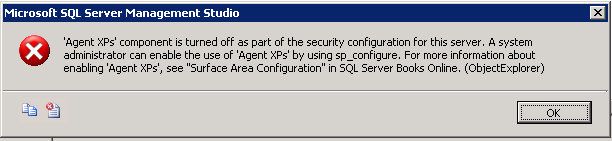
Agent xps component is turned off as part of the security configuration for this server

You are going to get this error on SQL 2005 is you are trying to create a maintenance plan; the problem is that your SQL Server Agent is not running, which menas is set to run manually, so you have to change it to start automatically, so all you have to do is follow the next simple steps:

1.- Open the SQL Server Surface Area Configuration
2.- Select the Surface Area Configuration for Services and Connections
3.- Expand the SQL Server Agent
4.- On Service, change the Startup type to Automatic
5.- Click Start button
6.- Click the OK button

Now you are ready to create your maintenance plan.


Monday, January 21, 2013

Warning: the following job steps cannot be reached with the current job step flow logic


If you get this error, I would guess that you have somehow set another step instead of the first one as the starting step in the package. 

To solve this problem:
  • Right click on the Jjob and select "Properties"
  • Click on the "Steps" option
  • Below the Job list, see the "Start step" option, verify the step showed is the first one
  • Click the Ok button so save any modifications

Thursday, March 8, 2012

Unable to Attach the database after deleting the log file


If you are unable to Attach the database after deleting the log file and you get the error message:
The physical file ...... may be incorrect
This error happens when a database was not shutdown cleanly we are unable to attach it property with the command:

--
--
EXEC sp_attach_single_file_db @dbname = 'MyDB', 
    @physname = N'C:\Program FilesSQL Server\\Data\MyDB';
--
--


To fix this problem we have to:
-Create a database of equal size to the one you're trying to attach
-Shutdown the server
-Swap in the old mdf file
-Bring up the server and let the database attempt to be recovered and then go into suspect mode
-Put the database into emergency mode with ALTER DATABASE
     --
     --
     EXEC sp_resetstatus 'MyDB';
     ALTER DATABASE MyDBSET EMERGENCY
     --
     --

          If you can not do it, in the sysdatabase look for your db and set the stats field to 32768
          After the db is in emergency mode you can read from it using enterprise manager SQL 2005


-Bringup the database in emergency mode, you should be able to read from it
          If the DB is corrupted or if it is in "Suspect" mode run the command to rebuild:
                DBCC CHECKDB (dbname, REPAIR_ALLOW_DATA_LOSS)
     --
     --
     DBCC checkdb('yourDBname')
     ALTER DATABASE yourDBname SET SINGLE_USER WITH ROLLBACK IMMEDIATE
     DBCC CheckDB ('yourDBname', REPAIR_ALLOW_DATA_LOSS)
     ALTER DATABASE yourDBname SET MULTI_USER
     --
     --

-Create a new database and extract the data from the database that is in emergency mode

The database should be ready to be used, there is a probability you lost some information or the tables lost the default values and identities.
This is a great article with all the steps:
http://www.gerixsoft.com/blog/mssql/recovering-mssql-suspect-mode-emergency-mode-error-1813


Thursday, May 19, 2011

SQL Database is compressed but does not reside in a read-only database or filegroup

If you get the next error when trying to access your database:

The file "C:\Program Files\Microsoft SQL Server\MSSQL.2\MSSQL\DATA\mastlog.ldf" is compressed but does not reside in a read-only database or filegroup. The file must be decompressed.


The problem is that the database file is compressed, to uncompress the database file:

  • Right click on it
  • Select properties
  • Click on the Advance button
  • Be sure the Compress contents to save disk space, is not checked