Showing posts with label Word. Show all posts

Tuesday, May 22, 2012

-- Setting the default format with Paste Special in Word 2007

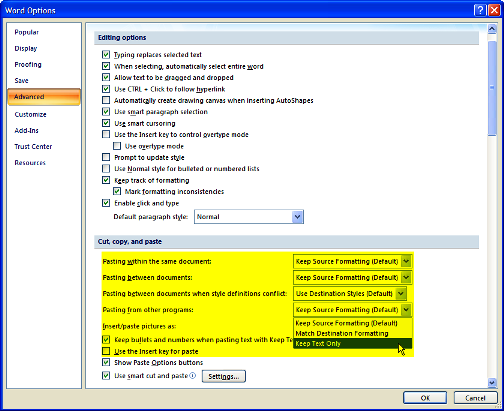
It is possible to set the defualt formatting in the "Paste Special" command to Unformatted Text, most of the time we want to keep the that Word or Excel documents to retain the current format and not from which they were copied.


To chance your default Paste for Word 2007:
  1. Click the Office Button
  2. Click Word Options
  3. Click Advanced, and go to the Cut, Copy, Paste section
  4. Set the options to "Keep text only"


Wednesday, April 20, 2011

How to show in word Heading4 in the table of contents

By default, Word includes only the top three levels in a table of contents.

To see more headings, you can manually edit the TOC field code.

  1. Press Alt+F9 to display field codes. You should see something similar to this: { TOC \o "1-3" \h } on the table of contents
  2. Type 4 instead of 3 
  3. Press Alt+F9 to hide the field codes 
  4. Press F9 to update the TOC

Thursday, February 17, 2011

How to convert Footnotes to Endnotes and vice versa

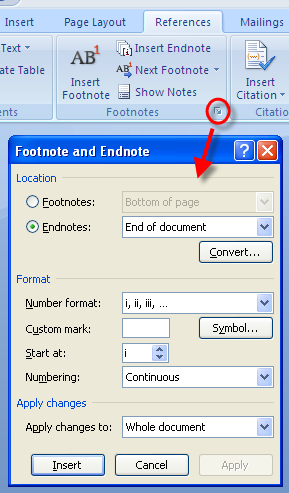
If you want to How to convert Footnotes to Endnotes and vice versa follow the next steps:

  1. Launch the Footnote and Endnote menu
  2. Select the button Convert in the Location section
  3. The Convert Notes window will be showed
  4. Select the option Convert all footnotes to end notes (or Endnotes to Footnotes)
  5. Click Ok

How to reuse a Footnote in word

If you want to reuse a footnote in a word document, follow the next steps:

  1. Put the cursor where you are going to use the footnote
  2. Go to References >> Cross-reference, a dialog box will open
  3. From the Reference type select the option Footnote
  4. Select the Footnote you want to reuse
  5. Check the box Insert as hyperlink if you want to make reference to the original one
  6.  Click the Insert button