Thursday, March 8, 2012

Unable to Attach the database after deleting the log file


If you are unable to Attach the database after deleting the log file and you get the error message:
The physical file ...... may be incorrect
This error happens when a database was not shutdown cleanly we are unable to attach it property with the command:

--
--
EXEC sp_attach_single_file_db @dbname = 'MyDB', 
    @physname = N'C:\Program FilesSQL Server\\Data\MyDB';
--
--


To fix this problem we have to:
-Create a database of equal size to the one you're trying to attach
-Shutdown the server
-Swap in the old mdf file
-Bring up the server and let the database attempt to be recovered and then go into suspect mode
-Put the database into emergency mode with ALTER DATABASE
     --
     --
     EXEC sp_resetstatus 'MyDB';
     ALTER DATABASE MyDBSET EMERGENCY
     --
     --

          If you can not do it, in the sysdatabase look for your db and set the stats field to 32768
          After the db is in emergency mode you can read from it using enterprise manager SQL 2005


-Bringup the database in emergency mode, you should be able to read from it
          If the DB is corrupted or if it is in "Suspect" mode run the command to rebuild:
                DBCC CHECKDB (dbname, REPAIR_ALLOW_DATA_LOSS)
     --
     --
     DBCC checkdb('yourDBname')
     ALTER DATABASE yourDBname SET SINGLE_USER WITH ROLLBACK IMMEDIATE
     DBCC CheckDB ('yourDBname', REPAIR_ALLOW_DATA_LOSS)
     ALTER DATABASE yourDBname SET MULTI_USER
     --
     --

-Create a new database and extract the data from the database that is in emergency mode

The database should be ready to be used, there is a probability you lost some information or the tables lost the default values and identities.
This is a great article with all the steps:
http://www.gerixsoft.com/blog/mssql/recovering-mssql-suspect-mode-emergency-mode-error-1813


Friday, February 24, 2012

JQuery check all checkboxes

This is the easiest way to check and uncheck checkboxes in a form.
   
//
// Include a reference to the Jquery library


Thursday, October 6, 2011

Execution of the ASP page caused the Response Buffer to exceed its configured limit

If you are getting this error.

Response object error 'ASP 0251 : 80004005'  Response Buffer Limit Exceeded
Execution of the ASP page caused the Response Buffer to exceed its configured limit. 

The reason this is happening is because the IIS 6 cannot handle the large response.

To solve this problem:

  1. Edit the metabase.xml to increase the AspBufferingLimit value that usually is 4194304 (bytes, that means 4Mb)
    1. Before you edit the file on ISS right click the server and check the box "Enable Direct Metabase Edit"
    2. The file is located %SYSTEMROOT%\system32\inetsrv
  2. Use Response.Flush in your code to send blocks of data to the browser
  3. At the top of the page response.buffer = true in your asp code

Thursday, July 28, 2011

SQL Server blocked access to procedure 'sys.sp_OACreate' of component 'Ole Automation Procedures'

SQL Server blocked access to procedure 'sys.sp_OACreate' of component 'Ole Automation Procedures' because this component is turned off as part of the security configuration for this server. A system administrator can enable the use of 'Ole Automation Procedures' by using sp_configure. For more information about enabling 'Ole Automation Procedures', see "Surface Area Configuration" in SQL Server Books Online. [SQLSTATE 42000] (Error 15281).  The step failed.

To see the the current setting of OLE Automation procedures:
--

EXEC sp_configure 'Ole Automation Procedures';
GO

--

To give access to the 'Ole Automation Procedures' use this code:
sp_configure 'show advanced options', 1;
GO
RECONFIGURE;
GO

sp_configure 'Ole Automation Procedures', 1;
GO
RECONFIGURE;
GO

Tuesday, June 28, 2011

Flash movie not showing on Firefox and Chrome

When the flash movie is showing only on IE and is not working on other browsers looks like you are only using the OBJECT tag to show the movie:

<object classid="clsid:D27CDB6E-AE6D-11cf-96B8-444553540000" codebase="http://download.macromedia.com/pub/shockwave/cabs/flash/swflash.cab#version=9,0,16,0" height="180" width="630">             <param name="movie" value="movie.swf">
            <param name="quality" value="high">
            <param name="play" value="true">
            <param name="LOOP" value="false">
        </object>


This tag only works on IE, so we need to add the EMBED tag in order to show the movie in other browsers:

<object classid="clsid:D27CDB6E-AE6D-11cf-96B8-444553540000" 
                codebase="http://download.macromedia.com/pub/shockwave/cabs/flash/swflash.cab#version=9,0,16,0"
                width="630" height="180" >
            <param name="movie" value="movie.swf">
            <param name="quality" value="high">
            <param name="play" value="true">
            <param name="LOOP" value="false">
            <embed src="movie.swf" 
                    width="630" height="180" play="true" loop="false" 
                    quality="high" pluginspage="http://www.macromedia.com/go/getflashplayer" 
                    type="application/x-shockwave-flash">
            </embed>
        </object>


Tuesday, June 14, 2011

When deleting links getting "No New Data Found to Register" on step 2

When Correcting Link Quantities on Items that are Published in the step 2 we need to get the message:
Successfully Registered Data.

If you get the message:
No New Data Found to Register

Looks like in the Excel tool kit, tab Link, column Transaction type you don't have selected the "DELETE" option, correct it and submitted again.

Thursday, June 9, 2011

In Excel 2007 how do you change column headers from numbers to letters

If you want to change the header letters in Excel to numbers or from numbers to letters do this:

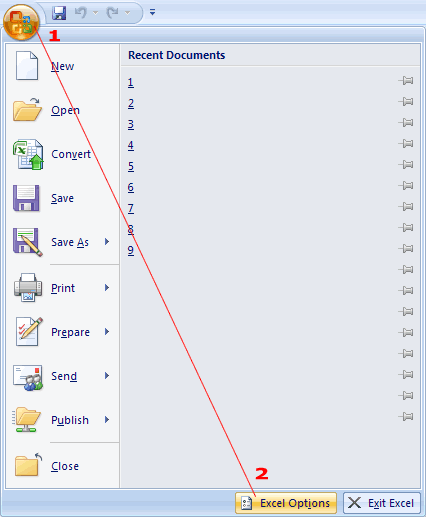
  • Click the office button (Large round button top left)

  • Click on the Excel options

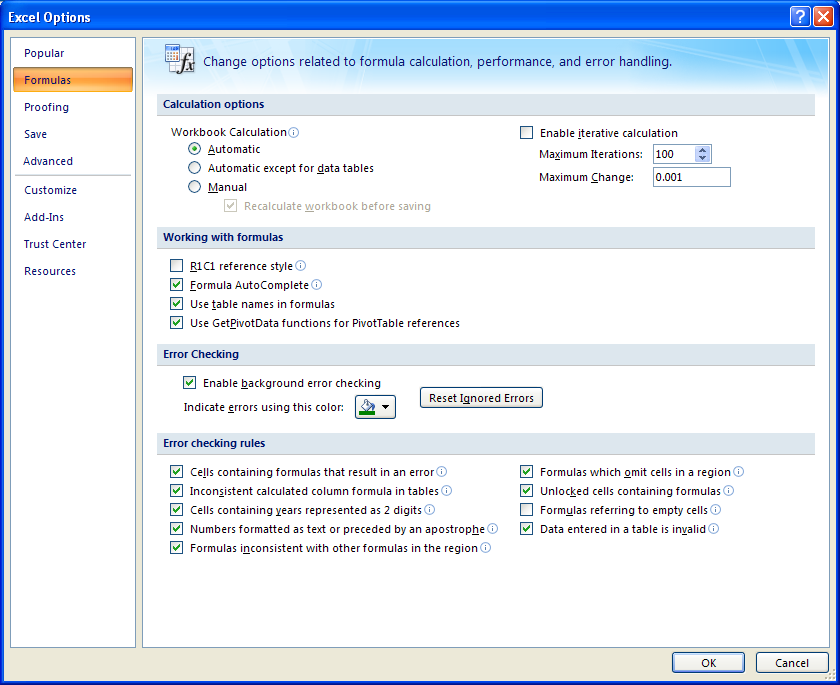
  • Go to Formulas
  • Check or uncheck the R1C1 reference style