Tuesday, June 28, 2011

Flash movie not showing on Firefox and Chrome

When the flash movie is showing only on IE and is not working on other browsers looks like you are only using the OBJECT tag to show the movie:

<object classid="clsid:D27CDB6E-AE6D-11cf-96B8-444553540000" codebase="http://download.macromedia.com/pub/shockwave/cabs/flash/swflash.cab#version=9,0,16,0" height="180" width="630">             <param name="movie" value="movie.swf">
            <param name="quality" value="high">
            <param name="play" value="true">
            <param name="LOOP" value="false">
        </object>


This tag only works on IE, so we need to add the EMBED tag in order to show the movie in other browsers:

<object classid="clsid:D27CDB6E-AE6D-11cf-96B8-444553540000" 
                codebase="http://download.macromedia.com/pub/shockwave/cabs/flash/swflash.cab#version=9,0,16,0"
                width="630" height="180" >
            <param name="movie" value="movie.swf">
            <param name="quality" value="high">
            <param name="play" value="true">
            <param name="LOOP" value="false">
            <embed src="movie.swf" 
                    width="630" height="180" play="true" loop="false" 
                    quality="high" pluginspage="http://www.macromedia.com/go/getflashplayer" 
                    type="application/x-shockwave-flash">
            </embed>
        </object>


Tuesday, June 14, 2011

When deleting links getting "No New Data Found to Register" on step 2

When Correcting Link Quantities on Items that are Published in the step 2 we need to get the message:
Successfully Registered Data.

If you get the message:
No New Data Found to Register

Looks like in the Excel tool kit, tab Link, column Transaction type you don't have selected the "DELETE" option, correct it and submitted again.

Thursday, June 9, 2011

In Excel 2007 how do you change column headers from numbers to letters

If you want to change the header letters in Excel to numbers or from numbers to letters do this:

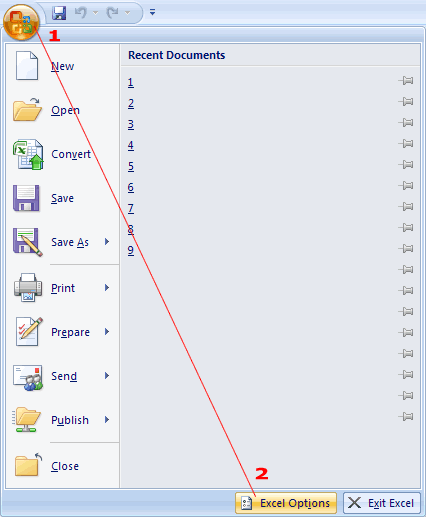
  • Click the office button (Large round button top left)

  • Click on the Excel options

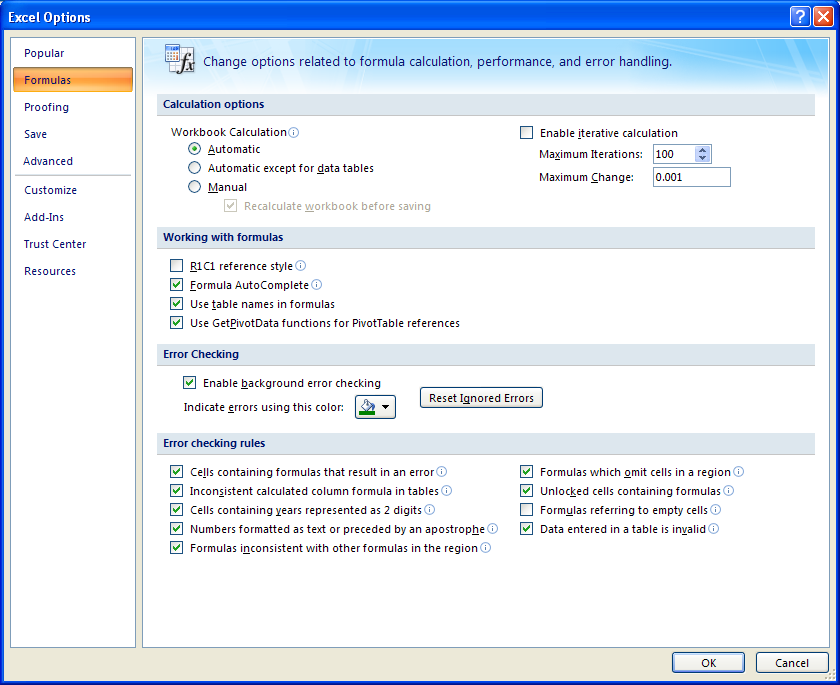
  • Go to Formulas
  • Check or uncheck the R1C1 reference style


Thursday, May 19, 2011

SQL Database is compressed but does not reside in a read-only database or filegroup

If you get the next error when trying to access your database:

The file "C:\Program Files\Microsoft SQL Server\MSSQL.2\MSSQL\DATA\mastlog.ldf" is compressed but does not reside in a read-only database or filegroup. The file must be decompressed.


The problem is that the database file is compressed, to uncompress the database file:

  • Right click on it
  • Select properties
  • Click on the Advance button
  • Be sure the Compress contents to save disk space, is not checked 


Friday, April 22, 2011

Link not open in Internet explorer 8 and 9

If you are facing a problem with IE9 or IE8, that when you open any site in internet explorer, it opens but if you click on any link of any site window opens but with blank, is because IE8 and IE9 on Vista and Windows 7 has a new security restriction that is turned on by default for ALL zones on the security tab.

To solve the problem:

  • Go to Internet Options - Security Tab - Internet - click on the "Custom" button
  • Scroll down to the Miscellaneous section
  • Enable the option "Allow script-initiated windows without size or position constraints"
  • Enable the option "Allow websites to open windows without address or status bar"


There is another possibility, maybe you have DCOM settings, to solve this problem, follow the next steps:
  • Run command
  • Open "DCOMCNFG" to open up the Component services
  • Expand "Component services and computers" 
  • Right hand click on "properties"
  • Click on "Default Properties"
  • Ensure that Default Authentication Level is "Connect"
  • Ensure that Default Impersonation Level is "Identify"


If the options mentioned did not solve your problem there is another possible cause, the (Default) value setting in one or more of registry keys points to an incorrect location for the Urlmon.dll file.
To solve the problem follow the next steps:

  • Click Start, and then click Run
  • Type regsvr32 urlmon.dll, and then click OK
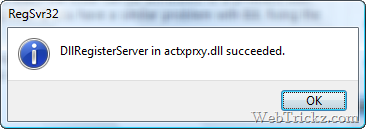
  • When you receive the "DllRegisterServer in urlmon.dll succeeded" message, click OK
  • Repeat the process for the next files:
    • Shdocvw.dll
      Actxprxy.dll
      Oleaut32.dll
      Mshtml.dll
      Browseui.dll
      Shell32.dll
  • Now all you have to do is restart your machine


Wednesday, April 20, 2011

How to show in word Heading4 in the table of contents

By default, Word includes only the top three levels in a table of contents.

To see more headings, you can manually edit the TOC field code.

  1. Press Alt+F9 to display field codes. You should see something similar to this: { TOC \o "1-3" \h } on the table of contents
  2. Type 4 instead of 3 
  3. Press Alt+F9 to hide the field codes 
  4. Press F9 to update the TOC

Tuesday, March 29, 2011

How to get nested tags using Linq To XML query

Let's say we have the next XML:


This is a link example


        Text...
        Text...
        text...
        Text...
        Text...
      
      
        Text
        Text
        Text
      
      
        Info
        Info
        Info
        Info


And you want to get the tags inside on the chapter number two.
You can use this code:
// Load the document
XDocument loadedData = XDocument.Load("kjv.xml");

// Get the testament
IEnumerable<xelement> xmlTestament = loadedData.Descendants("testament").Where(c => ((string)c.Attribute("name")).Equals("New"));

// Get the book
IEnumerable<xelement> xmlBook      = xmlTestament.Descendants("book").Where(c => ((string)c.Attribute("name")).Equals("Matthew"));

// Get the chapter
IEnumerable<xelement> xmlChapter = xmlBook.Descendants("chapter").Where(c => ((string)c.Attribute("number")).Equals("2"));

foreach (string s in xmlChapter.Descendants("verse"))
{
  listBox1.Items.Add(s);
}

// -----------------------------------------------------------------------------------------


This is another way to get the info needed
//
// Load the document
XDocument loadedData = XDocument.Load("kjv.xml");

// Get the info
IEnumerable<XElement> data1 = from query in loadedData.Descendants("testament")
                                             where (string)query.Attribute("name").Value == "New"
                                        from book in loadedData.Descendants("book")
                                             where (string)book.Attribute("name").Value == "Matthew"
                                        from chap in loadedData.Descendants("chapter")
                                             where (string)chap.Attribute("number").Value == "2"
                                        select chap;

foreach (string s in data1.Descendants("verse"))
{
   listBox1.Items.Add(s);
}


//-----------------------------------------------------------------------------------