Friday, August 7, 2015

Visual Studio “Could not copy... Exceeded count to 10.Failed” during build


Error:
Error   10  Could not copy "obj\Debug\MyApp.Controlls.dll" to
 "bin\Debug\MyApp.Controlls.dll". 
 Exceeded retry count of 10. Failed.    


Error   41  Unable to copy file "obj\Debug\MyApp.exe" to
"bin\Debug\MyApp.exe". The process cannot access the file
'bin\Debug\MyApp.exe' because it is being used by another 
process. 

Cause:
 Most of the time this occurs when the debug process was stopped somewhere in an exception.

Solution 1:
 

Try to Build >> Clean Solution, then Rebuild project


Solution 2:
 

Close Visual Studio, delete the 'bin' and 'obj' folders, then rebuild the project


Solution 3:
 

Go to task manager, localize your project exe file and kill it, then rebuild the project

Tuesday, June 30, 2015

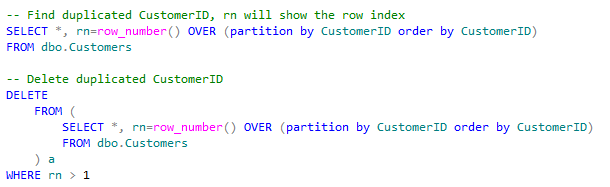
Find or Delete duplicate records in a table

The next query will help you when you are trying to find or/and delete duplicated records on your table, the example uses a windows function and the order by will indicate which record to keep when deleting.


Wednesday, June 3, 2015

Error calling store procedure from other: The transaction manager has disabled its support for remote/network transactions

If tring to execute a stored procedure on server a with distributed transaction which will update the data on another server, and you are getting the next error:

OLE DB provider "SQLNCLI" for linked server "MYSERVER" returned message "The transaction manager has disabled its support for remote/network transactions.".
Msg 7391, Level 16, State 2, Procedure prc_my_code, Line 32
The operation could not be performed because OLE DB provider "SQLNCLI" for linked server "MYSERVER" was unable to begin a distributed transaction.

This means the partner transaction manager has disabled its support for remote/network transactions on the server to be called.

To fix this issue follow the next steps:
Be sure the “Distribute Transaction Coordinator” Service is running on both database server computer and client computers
1. Go to “Administrative Tools >> Services”
2. Turn on the “Distribute Transaction Coordinator”

Now turn on the option to Allow Remote Clients option on the computer running the store procedure
1. Go to “Administrative Tools >> Component Services”
2. Go to “Component Services >> Computers >> My Computer”
3. Right click on “My Computer >> Properties >> MSDTC”
4. Click “Security Configuration”
5. Check
              “Network DTC Access”
              “Allow Remote Client”,
              “Allow Inbound/Outbound”
6. Select to restart the service
7. If this doesn't work, you may need to restart the server



Friday, January 9, 2015

SSIS - Connection manager working on preview but no working when running package

If you are trying to pull data and the connection manager is working fine and you are able to preview the tables from the database, but when you run the package it fails, the problem is the driver used to connect, it doesn't support 64 bit or you don't have a 64 bit installed.

You probably get errors like:

  • Error: SSIS Error Code DTS_E_OLEDB_NOPROVIDER_64BIT_ERROR.  The requested OLE DB provider OraOLEDB.Oracle.1 is not registered -- perhaps no 64-bit provider is available.
  • [Execute SQL Task] Error: Failed to acquire connection "NADCWDDBS01A_INS01A.LegalReview". Connection may not be configured correctly or you may not have the right permissions on this connection.
  • Etc.

To solve the problem:

  1. Go to your SSIS project properties
  2. From Configuration properties select Debugging
  3. On the Data Flow Optimizations change the option Run64BitRuntime to false


Tuesday, January 6, 2015

Error Starting Script Editor in SSIS 2005

If you are having a problem launching the design script from the script task editor in business intelligence development studio 2005, the solution is installing the "Microsoft SQL Server 2005 Service Pack 3 (KB955706)", this update fixes this issue.

This is the link to download the Microsoft SQL Server 2005 Service Pack 3 (KB955706)


Wednesday, September 24, 2014

ASP.NET MVC Razor Unrequired property keeps getting data-val-required attribute

If you have the problem that your text field validation gets generated althoug there is no Required attribute set on property, use the next code in the Application_Start to force the compiler to validate only if there is a required attribute on the property:

// Whit this line of code you will remove data-val-required DataAnnotationsModelValidatorProvider.AddImplicitRequiredAttributeForValueTypes = false;

// With these two lines you will remove data-val-number and data-val ModelValidatorProviders.Providers.Clear();
ModelValidatorProviders.Providers.Add(new DataAnnotationsModelValidatorProvider());


Thursday, September 11, 2014

ASP.NET MVC Razor Override "id" and “name” attribute with TextBoxFor

Use the code below as example to override the id or/and name attributes with TextBoFor, something really important to keep in mind is that "id" and "Name" is case sensitive.
    
   @Html.TextBoxFor(x => x.Data, new { Name = Model.Name + "_Custom", id = Model.ID + "_Custom" })