            System.DateTime dt1 = new System.DateTime(2011, 1, 31, 12, 0, 0);

            System.DateTime dt2 = new System.DateTime(2011, 2, 30, 12, 0, 0);

            // Option One
            System.TimeSpan diff = dt1  - dt2;

            // Option two
            System.TimeSpan diff = dt1.Subtract(dt2);

            Console.WriteLine("Diff in days " + diff.Days);

            Console.WriteLine("Diff in total days " + diff.TotalDays);

            Console.WriteLine("Diff in hours " + diff.Hours);

            Console.WriteLine("Diff in minutes " + diff.Minutes);

            Console.WriteLine("Diff in seconds" + diff.Seconds);
Monday, January 31, 2011
Calculating Date Difference in C#
In this example we show two ways to calculate the difference between two dates:

Wednesday, January 26, 2011
Search option starts double click a folder or drive
This usually happens after adding/modifying the File Folder or Drive entries via the Folder Options File Types dialog, as an attempt to add additional context menu items such as Command Prompt here, Print Directory for folders or drives. To fix it you have two options.
Using the command window:
- Click start
- Click Run
- Type on the command window: regsvr32 / i shell32.dll
Using the registry:
- Open the registry editor
- Navigate to:
- HKEY_CLASSES_ROOT \ Directory \ shell
- HKEY_CLASSES_ROOT \ Drive \ shell
- On the right pane click the default value
- Click modify in the Edit menu
- Type in the value data box none
- Click OK
Source:
http://windowsxp.mvps.org/searchwindow.htm
Friday, January 21, 2011
How to get combined columns NOT IN another table
Lets say we have two tables:
- TableA
- item_no
- upc
- TableB
- item_no
- upc
One item_no can have one or more upcs
On the TableA we have 150 records, on the TableB we have 100 records.
We want to know which items with its upc doesn't exist on the TableB.
The easiest way to solve the problem is join the two columns to manipulate them as one:
   -- Example to find rows not in other table

   SELECT TableA.item_no + '@' + TableA.upc
       FROM TableA
       WHERE TableA.item_no + '@' + TableA.upc NOT IN (
                select TableB.item_no + '@' + TableB.upc FROM TableB
              )
Friday, January 14, 2011
Controls for windows mobile 6.x
This is a list of some available controls for windows mobile 6.x
Fluid – Windows Mobile 6.x Touch Controls
Fluid is a .NET 2.0 control library for Windows Mobile 6.0/6.1 with touch controls.
Price
Free, open source.
Image

Code example
Home site
http://fluid.codeplex.com/
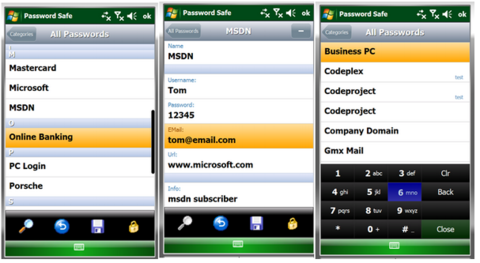
Windows Mobile Password Safe
Password Safe is a .NET 2.0 Mobile application that allows you to keep your passwords in your mobile secured with the top secure AES encryption. It provides a nice touch surface with gestures, and can be completely used without a stylus, except when you're writing or editing new passwords.
Price
Free, open source
Image

Code example
http://www.codeproject.com/KB/windows/MobilePasswordSafe.aspx
Touch Controls Suite 2
Touch Controls Suite 2 is the leading touch UI component suite that allows software developers to create graphically stunning, highly intuitive touch screen user interfaces for Windows Mobile Smartphone applications that are based on the Microsoft .NET Compact Framework (.NETCF).
Price
$99.00
Image
 Source example
http://www.mirabyte.com/en/products/touch-controls-suite/
Smart Device Framework
The Smart Device Framework is aimed at developers wanting to simplify and reduce the cost of their development experience using the .NET Compact Framework. By providing useful extensions the core .NET Compact Framework class libraries, the Smart Device Framework enables developers to concentrate on building core application functionality.
Price
Free / $50 / $500
Image
 Home site
http://opennetcf.com/CompactFramework/Products/SmartDeviceFramework/tabid/65/Default.aspx
Fluid – Windows Mobile 6.x Touch Controls
Fluid is a .NET 2.0 control library for Windows Mobile 6.0/6.1 with touch controls.
Price
Free, open source.
Image
Code example
private void Form1_Load(object sender, EventArgs e)
{
    //Main Panel
    FluidPanel mainPanel = new FluidPanel();
    mainPanel.Bounds = new Rectangle(0, 0, 240, 300);
    mainPanel.BackColor = Color.Red;
    mainPanel.GradientFill = true;
    mainPanel.GradientFillOffset = 30;
    mainPanel.ForeColor = Color.White;
    mainPanel.ShowMaximized();
    fluidHost1.Add(mainPanel);

    //Label
    FluidLabel h1 = new FluidLabel("Fluid サンプル", 0, 0, 240, 40);
    h1.ShadowColor = Color.Black;
    h1.ForeColor = Color.White;
    h1.Alignment = StringAlignment.Center;
    h1.LineAlignment = StringAlignment.Center;
    h1.Font = new Font(FontFamily.GenericSansSerif, 12f, FontStyle.Bold);
    h1.Anchor = FluidControl.AnchorTLR;
    fluidHost1.Add(h1);

    //
    FluidButton okBtn = new FluidButton("OK", 70, 200 - 40, 100, 32);
    okBtn.BackColor = Color.Black;
    //okBtn.Click += new EventHandler(okBtn_Click);
    okBtn.ForeColor = Color.White;
    okBtn.Anchor = FluidControl.AnchorBL;
    fluidHost1.Add(okBtn);
}
Home site
http://fluid.codeplex.com/
Windows Mobile Password Safe
Password Safe is a .NET 2.0 Mobile application that allows you to keep your passwords in your mobile secured with the top secure AES encryption. It provides a nice touch surface with gestures, and can be completely used without a stylus, except when you're writing or editing new passwords.
Price
Free, open source
Image

Code example
void delPasswordButton_Click(object sender, EventArgs e)
{
    passwordToRemove = passwordsListBox.SelectedPassword;
    if (passwordToRemove != null)
    {
        MessageDialog dialog = new MessageDialog();
        dialog.Message = "Delete Password?";
        dialog.Result += new EventHandler(dialog_Result);
        dialog.ShowModal(ShowTransition.FromBottom);
    }
}

void dialog_Result(object sender, Fluid.Classes.DialogEventArgs e)
{
    switch (e.Result)
    {
        case System.Windows.Forms.DialogResult.OK:
            ListBuilder.Instance.DeletePassword(passwordToRemove);
            UpdatePasswords();
            this.GoBack();
            break;
    }
}
Home sitehttp://www.codeproject.com/KB/windows/MobilePasswordSafe.aspx
Touch Controls Suite 2
Touch Controls Suite 2 is the leading touch UI component suite that allows software developers to create graphically stunning, highly intuitive touch screen user interfaces for Windows Mobile Smartphone applications that are based on the Microsoft .NET Compact Framework (.NETCF).
Price
$99.00
Image

private void loadList(AnimationDirection ad, AnimationType at)
        {
            //XmlNodeList lName = root.GetElementsByTagName("name");
            //XmlNodeList lDesc = root.GetElementsByTagName("desc");
            //TreeNode RootNode = new TreeNode();

            touchListBox1.PrepareAnimation();
            touchListBox1.Items.Clear();
            touchListBox1.BackColor = System.Drawing.SystemColors.InactiveCaption; //System.Drawing.SystemColors.ControlDark;

            //for (int i = 0; i < lName.Count; i++)
            for (int i = 0; i < root.ChildNodes.Count; i++ )
            {
                TouchListDefaultItem di = getItemList(root.ChildNodes[i]["name"].InnerText, root.ChildNodes[i]["desc"].InnerText, i);
                touchListBox1.Items.Add(di);

                TouchListHeaderItem hi = getItemSpacer();
                touchListBox1.Items.Add(hi);
            }

            //animationType = AnimationType.atSlide;

            //touchListBox1.Refresh();
            touchListBox1.UpdateList();  // (AnimationDirection.adLeft);  //(false); //(ad, at, false);
        }
Home sitehttp://www.mirabyte.com/en/products/touch-controls-suite/
Smart Device Framework
The Smart Device Framework is aimed at developers wanting to simplify and reduce the cost of their development experience using the .NET Compact Framework. By providing useful extensions the core .NET Compact Framework class libraries, the Smart Device Framework enables developers to concentrate on building core application functionality.
Price
Free / $50 / $500
Image

http://opennetcf.com/CompactFramework/Products/SmartDeviceFramework/tabid/65/Default.aspx
Programatically make xml tags look aligned
The next code is useful for making your XML tags a little more readable by aligning the tags.
public static String xmlAligned(String Xml)
        {
            String Result = Xml;
            if (Xml.Length != 0)
            {
                try
                {
                    // Load the XmlDocument with the XML variable
                    XmlDocument D = new XmlDocument();
                    D.LoadXml(Xml);
                    MemoryStream MS = new MemoryStream();
                    XmlTextWriter W = new XmlTextWriter(MS, System.Text.Encoding.Unicode);

                    // Format the XML document
                    W.Formatting = Formatting.Indented;

                    // Write the Xml into a formatting XmlTextWriter
                    D.WriteContentTo(W);
                    W.Flush();
                    MS.Flush();

                    // Rewind the MemoryStream in order to read its contents.
                    MS.Position = 0;

                    // Read MemoryStream contents
                    StreamReader SR = new StreamReader(MS);

                    // Get the text
                    String FormattedXml = SR.ReadToEnd();

                    // Get the results
                    Result = FormattedXml;

                    try
                    {
                        // Close all the resources used
                        MS.Close();
                        MS = null;
                        W.Close();
                        W = null;
                    }
                    catch { }
                }
                catch { }
            }

            // Return the aligned XML
            return Result;
        }
XML Programatically make xml tags look aligned
The next code is useful for making your XML tags a little more readable by aligning the tags.
public static String xmlAligned(String Xml)
        {
            String Result = Xml;
            if (Xml.Length != 0)
            {
                try
                {
                    // Load the XmlDocument with the XML variable
                    XmlDocument D = new XmlDocument();
                    D.LoadXml(Xml);
                    MemoryStream MS = new MemoryStream();
                    XmlTextWriter W = new XmlTextWriter(MS, System.Text.Encoding.Unicode);

                    // Format the XML document
                    W.Formatting = Formatting.Indented;

                    // Write the Xml into a formatting XmlTextWriter
                    D.WriteContentTo(W);
                    W.Flush();
                    MS.Flush();

                    // Rewind the MemoryStream in order to read its contents.
                    MS.Position = 0;

                    // Read MemoryStream contents
                    StreamReader SR = new StreamReader(MS);

                    // Get the text
                    String FormattedXml = SR.ReadToEnd();

                    // Get the results
                    Result = FormattedXml;

                    try
                    {
                        // Close all the resources used
                        MS.Close();
                        MS = null;
                        W.Close();
                        W = null;
                    }
                    catch { }
                }
                catch { }
            }

            // Return the aligned XML
            return Result;
        }
Thursday, January 13, 2011
XML reserved characters
XML reserves certain characters, including less-than (<), greater than (>), and ampersand (&).
To express these characters in your document data, use the equivalent character entity:
| less-than (<) | < |
| greater than (>) | > |
| ampersand (&) | & |
Here is an XML document fragment that uses character entities:
<equation> x < 2 </equation>
<rhyme> Jack & Jill </rhyme>
Alternatively, data can be protected from the XML parser in a CDATA section.
Use a CDATA section to escape text that would otherwise be recognized as markup.
<comedians>
  <comedian>
    <![CDATA[Abbott & Costello]]>
  </comedian>

  <comedian>
    <![CDATA[Laurel & Hardy]]>
  </comedian>

  <comedian>
    <![CDATA[Amos & Andy]]>
  </comedian>
</comedians>
Source:
https://studio.tellme.com/general/xmlprimer.html
Subscribe to:
Posts (Atom)