Monday, August 6, 2012

VB6 Heterogeneous queries require the ANSI_NULLS and ANSI_WARNINGS options to be set for the connection

If you are getting the next error on your VB6 applications when trying to run selects:


Heterogeneous queries require the ANSI_NULLS and ANSI_WARNINGS options to be set for the connection


Looks like the problem is in the ODBC connection. Be sure  you have selected the check boxes:
Use ANSI quoted identifiers
Use ANSI nulls, paddings and warnings


Friday, August 3, 2012

VB6 No creatable public component detected

If you get the error "No creatable public component detected" when trying to compile a new VB application like the one below, you need to change the Instancing value because it is private.


Just change the instancing to Multiuse or GlobalMultiuse:


Tuesday, July 17, 2012

Controls dynamically added in ASP.NET are lost after a postback

If you are loosing your controls added dynamically to a web page after a full or partial postback, is because you are not creating them in the Page.Init.

According to the ASP.NET Page Life Cycle, PostData (all values inputed on the client side) is applied between the Page.Init and Page.Load, so, if you add a control in the Page.Init, they will not lose their state and you don't have to recreate them.


        protected void Page_Init()
        {

        Control ct = ParseControl("");

        Page.Controls.add(ct);

        }


TemplateControl.ParseControl the easy way to add controls

The TemplateControl.ParseControl() is a powerfull tool to convert a string into a control, if you want to add controls to your web page this object will help you avoid a lot of coding.


// Create the label control
Control ct = ParseControl("");

// Add the control to the page
Page.Controls.Add(ct);

//
// Create a string with a table and a label
string tbl = "b
Text
"; // Create the control Control ctrl = Page.ParseControl(tbl); // Add it to the page PageControls.Add(ctrl);

Tuesday, June 26, 2012

-- How to get all field names in a table using sql query

You can get the information of the columns in a table programatically using a query.


  -- This query will return all the information of the table named MyTable
  SELECT * 
  FROM   information_schema.columns
  WHERE  table_name = 'MyTable'


Friday, May 25, 2012

System.Configuration.ConfigurationManager not found

If you added the reference in your code already:


using System.Configuration;

but still the System.Configuration.ConfigurationManager.ConnectionStrings is not found in your code, looks like you need to manually add a reference to the System.Configuration.dll file.

To add the System.Configuration follow the next simple steps:

  1. Righ click on the references folder
  2. Select Add a reference
  3. Select Assemblies >> Framework
  4. Search for the System.Configuration and select it
  5. Click the Add button

Tuesday, May 22, 2012

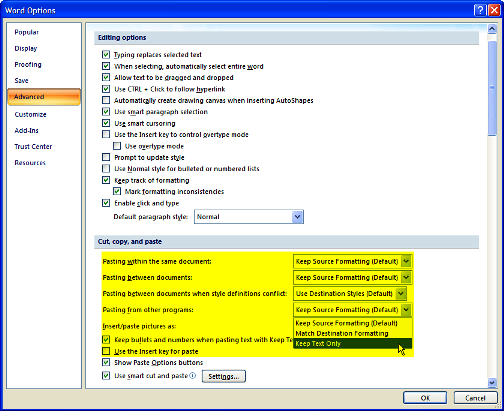
-- Setting the default format with Paste Special in Word 2007

It is possible to set the defualt formatting in the "Paste Special" command to Unformatted Text, most of the time we want to keep the that Word or Excel documents to retain the current format and not from which they were copied.


To chance your default Paste for Word 2007:
  1. Click the Office Button
  2. Click Word Options
  3. Click Advanced, and go to the Cut, Copy, Paste section
  4. Set the options to "Keep text only"