Wednesday, June 20, 2018

Outlook error - You don't have appropriate permission to perform this operation.

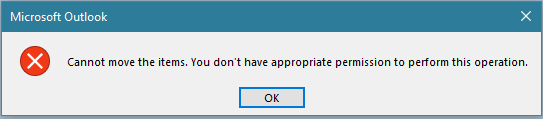
If you upgraded outlook to a newer version, maybe you are going to get a problem that you cannot move any mails to personal folder with the error:
"Cannot move the items. You don't have appropriate permission to perform this operation."


The error is because most likely the value of the key pstdisablegrow needs to be changed to allow the pst file to be changed.

To solve the problem:

  • Open the regedit to modify the outlook registry.
  • Locate the following registry key: HKEY_CURRENT_USER\Software\Microsoft\Office\14.0\Outlook\pst


  • Double click on the Dword pstdisablegrow and change the value from 1 to 0


That should fix the problem.

Monday, May 14, 2018

Error trying to attach a SQL database: CREATE FILE encountered operating system error 5(failed to retrieve text for this error. Reason: 15105)

If you are trying to attach a database using SQL management studio and you get the next error:

CREATE FILE encountered operating system error 5(failed to retrieve text for this error. Reason: 15105) while attempting to open or create the physical file

It is because you are not running management studio as an administrator and the account you are using doesn't have the rights to open the database file.

To solve this problem, right click on the SQL management studio shortcut and select:
Run as Administrator

That will let you attach the database.

SQL database stuck going offline

If you are trying to take a database offline and it got stuck, looks like it is not accessible anymore, but it’s not quite offline, you need to kill all the processes related with that Database.

With the next command, see all the processes running and look for the ones related with the database:

EXEC sp_who2

Get each SPID with the DBName database you want to take offline, the use the next command to kill each process

KILL <SPID>

This should solve your problem.

Friday, October 20, 2017

VS 2017 Error - Unable to start program http://localhost An operation is not legal

Scenario
You are trying to debug a web site in Visual Studio 2017

Error
Microsoft visual studio is giving the error: Unable to start program http://localhost An operation is not legal


Solution
Disable the JavaScript debugging

  • On VS go to Tools >> Options
  • Go to Debugging >> General
  • Uncheck the option Enable JavaScript debugging for ASP.NET (Chrome and IE)
  • Click OK and try again

Wednesday, October 18, 2017

VS 2017 MVC Core 2.0 error - Cannot find reference assembly 'Microsoft.AspNetCore.Mvc.Razor.ViewCompilation-x86.exe' file for package Microsoft.AspNetCore.Mvc.Razor.ViewCompilation-x86

Scenario

After compiling a MVC Core 2.0 project in VS 2017, the browser isn't displaying the site

Error
An unhandled exception occurred while processing the request.

Cannot find reference assembly 'Microsoft.AspNetCore.Mvc.Razor.ViewCompilation-x86.exe' file for package Microsoft.AspNetCore.Mvc.Razor.ViewCompilation-x86

Solution
Open the .csproj file in a text editor
In the section set the MvcRazorCompileOnPublish tag as true:
      <mvcrazorcompileonpublish>true</mvcrazorcompileonpublish>

Tuesday, October 17, 2017

VS 2017 MVC Core 2.0 publish fails

Scenario
Publish a MVC Core 2.0 project in Visual Studio 2017

Error
Severity
Error
Code
The command ""bin\Release\net461\Microsoft.AspNetCore.Mvc.Razor.ViewCompilation-x86.exe"
Description
@"obj\Release\net461\microsoft.aspnetcore.mvc.razor.viewcompilation.rsp"" exited with code 1


Solution
Open the .csproj file in a text editor
In the section set the MvcRazorCompileOnPublish tag as false:
      <mvcrazorcompileonpublish>false</mvcrazorcompileonpublish>

Tuesday, October 10, 2017

MVC Core - Duplicate Content Error after Upgrading Visual Studio 2017

Error

  • Dotnet-aspnet-codegenerator-design has stopped working
  • Duplicate 'Content' items were included. The .NET SDK includes 'Content' items from your project directory by default.
  • Failed to build the project. Please fix the build errors and retry again


Reason

The problem is a change on the RC3 release of Visual Studio 2017, if you have globs in your project and you try to build it using the newest SDK, you'll get the error. Basically your content, such as the files in wwwroot are now getting imported by the default includes that are built-in to Visual Studio and by the manual rules in your csproj file.


Solution 1

Open your web project file .csproj and remove the duplicated items specified in the error message


Basically remove the ItemGroup tag with all the wwwroot paths.


Solution 2

Open your web project file .csproj
Look for the tag
Add the next tag false


Friday, September 15, 2017

SSIS Error - The value cannot be converted because of a potential loss of data

Error

[OLE DB Source [167]] Error: There was an error with OLE DB Source.Outputs[OLE DB Source Output].Columns[MyColumn] on OLE DB Source.Outputs[OLE DB Source Output]. The column status returned was: "The value could not be converted because of a potential loss of data.".

Solution

Go into the source component then right clicking on it and choose "Show Advanced editor..."


From the Advance Editor select Input and Output Properties


Expand the OLE DB Source Output
Then expand the Output Columns
Select the column generating the error


O the properties section, scroll to the Length Data Type Property and increase the value to  something like 255.


Friday, June 16, 2017

MVC Core error - HTTP Error 502.5 - Process Failure

If you are deploying your project to Internet Information Services and you get the error below, there are several possible reasons according with microsoft.


Possible reasons:
  • If you published a self-contained application, confirm that you didn’t set a platform in buildOptions of project.json that conflicts with the publishing RID. For example, do not specify a platform of x86 and publish with an RID of win81-x64 (dotnet publish -c Release -r win81-x64). The project will publish without warning or error but fail with the above logged exceptions on the server.
  • Check the processPath attribute on the element in web.config to confirm that it is dotnet for a portable application or .\my_application.exe for a self-contained application. For a portable application, dotnet.exe might not be accessible via the PATH settings. Confirm that C:\Program Files\dotnet\ exists in the System PATH settings.
  • For a portable application, dotnet.exe might not be accessible for the user identity of the Application Pool. Confirm that the AppPool user identity has access to the C:\Program Files\dotnet directory. Confirm that you have correctly referenced the IIS Integration middleware by calling the .UseIISIntegration() method of the application’s WebHostBuilder().
  • If you are using the .UseUrls() extension method when self-hosting with Kestrel, confirm that it is positioned before the .UseIISIntegration() extension method on WebHostBuilder(). .UseIISIntegration() must set the Url for the reverse-proxy when running Kestrel behind IIS and not have its value overridden by .UseUrls().
I got this error, but in my case the problem was I didn't declared the environment variable ASPNETCORE_ENVIRONMENT, so the application wasn't able to get the appsettings..json file; after I added the variable I restarted the server and my site worked just fine.

Monday, June 12, 2017

ASP MVC Error Unable to connect to web server IIS Express

If you get the next error when trying to run your app from visual studio:


You can try different things to fix the problem

- Right click on your project, then select properties, click on the Debug section, assign a new port in the App URL direction


- In explorer go to the path \.vs\config and delete the applicationhost.config, then rebuild your project 


- Open the task manager and stop the IIS Express if is running so you can get a fresh instance


Wednesday, June 7, 2017

.Net Core Installation Error 0x80070003 - The system cannot find the path specified

If you are trying to install .Net Core on your server and you get the error:

.Net Core 1.0.1 VS 2015 Tooling Preview 2 - Installation Error 0x80070003 - The system cannot find the path specified.


That only means the install packages are not complete so we have to completed the installation; to do it follow the next steps:

- Open the command line

- Run the .Net Core installation file with the layout parameter from the command like


- You should get the confirmation message that .Net Core was successfully installed


Thursday, April 28, 2016

An ASP.NET setting has been detected that does not apply in Integrated managed pipeline mode.

If you get the error:

HTTP Error 500.22 - Internal Server Error

An ASP.NET setting has been detected that does not apply in Integrated managed pipeline mode.


Looks like you upgraded recently your project to a newer version.
To solve this problem, follow the next steps:
* In Visual Studio, select your web project
* In the properties section set the Managed Pipeline Mode to Classic
* Compile and re-run the web application


Tuesday, February 23, 2016

MVC error on IIS 7 and 7.5 The Web server is configured to not list the contents of this directory.

If you get the error:The Web server is configured to not list the contents of this directory.

It is because the MVC URLs end without .aspx, these will not be picked up by IIS and run through the intergrated pipeline and therefore you will end up with 404 not found errors.
Another possible cause is you are using a .Net 4.5 application on a server where it was installed after IIS.

To solve this problem consider how much traffic you will have on your site, if you are not going to have a lot of traffic use the attribute runAllManagedModulesForAllRequest with true value, but keep in mind all your registered HTTP modules run on every request, not just managed requests (e.g. .aspx). This means modules will run on ever .jpg .gif .css .html .pdf etc.

  <system.webServer>
    <modules runAllManagedModulesForAllRequests="true"/>
  </system.webServer>

But if you are going to have a lot of traffic it is better to add the routing module:

<system.webServer>
    <modules>
      <remove name="UrlRoutingModule-4.0" />
      <add name="UrlRoutingModule-4.0" 
           type="System.Web.Routing.UrlRoutingModule" 
            preCondition="" />
    </modules>
  </system.webServer>

Another solution is to install a patch from Microsoft that enables certain IIS 7.0 or IIS 7.5 handlers to handle requests whose URLs do not end with a period.
This is the link to download this patch:

https://support.microsoft.com/en-us/kb/980368


Wednesday, January 20, 2016

SSIS Error: The requested OLE DB provider Microsoft.Jet.OLEDB.4.0 is not registered. If the 64-bit driver is not installed, run the package in 32-bit mode. Error code: 0x00000000.

If you get the error:

Error: The requested OLE DB provider Microsoft.Jet.OLEDB.4.0 is not registered. If the 64-bit driver is not installed, run the package in 32-bit mode. Error code: 0x00000000.

If the problem is in your development studio, you can fix it by running the package in 32 bit mode on your project:

  1. Right-click your solution
  2. Click 'Properties'
  3. Select 'Debugging' node
  4. Set 'Run64BitRuntime' property to False
  5. Save and re-run your solution
  6. Click Apply
  7. Re-run your package

If the problem is in your SQL server put your package in a job and change the run time to 32bit:

  1. Go to SQL Serve Agent option
  2. Right click on Jobs and select 
  3. Go to steps and click on New
  4. Fill out the options with your package information
  5. Click on configuration
  6. Click on Advance
  7. Check on 32 bit
  8. Click on OK
  9. Complete your job and run it


Thursday, December 31, 2015

How to convert string to variable name in Javascript

If you need to create a variable dynamically on the server side and retrieve the value on the client side, use the next example to use the value assigned:

// Declare the variable name
var myStringName = "echoHello";

// Assign a value to the dynamic string variable
window[myStringName] = "Hello from dynamic string variable!";

// Show value
alert(window[myStringName]);

// Or call the variable name
alert(echoHello);


You can even assign a function to the dynamic string variable:

// Declare the variable name
var myStringName = "alertStringVariable";

// Assign a function to the dynamic variable
window[myStringName] = function () {
    alert("Hello from dynamic function variable...");
}

// Execute the function assigned of the variable
alertStringVariable();

Thursday, November 19, 2015

How to stop execution of SSIS Package from SSMS


If your package is running and you want to stop it from the SQL Management Studio follow this steps:

1.- Go to the Integration Services Catalogs and select the SSISDB catalog
2.- Go to the SSISDB catalog Right Click and select the “Active Executions”
3.- You will see the currently running packages, select the desired package then click STOP


How to map network drives programmatically in C#


Follow the next example to map a network drive programmatically:

// Map Network drive
System.Diagnostics.Process process = new System.Diagnostics.Process();
System.Diagnostics.ProcessStartInfo psi = new System.Diagnostics.ProcessStartInfo();

// Notes:
//      Use /C To carry out the command specified by string and then terminates
//      You can omit the passord or username and password
//      Use /PERSISTENT:YES to keep the mapping when the machine is restarted
psi.FileName      = "cmd.exe";
psi.Arguments     = @"/C net use X: \\MyServer\Folder01  /USER:MyDomain\MyUsername MyPassword /PERSISTENT:YES";
psi.WindowStyle   = System.Diagnostics.ProcessWindowStyle.Normal;
process.StartInfo = psi;

process.Start();


Tuesday, November 17, 2015

c# windows application, Error creating window handle (Win32 Exception) or red square with X across


If you are developing a windows application and you get an error like this one:

Application: Tool.exe Framework Version: v4.0.30319 Description: The process was terminated due to an unhandled exception. Exception Info: System.OutOfMemoryException Stack: at System.Drawing.Graphics.FromHdcInternal(IntPtr) at System.Drawing.Font.GetHeight() at System.Drawing.Font.get_Height() at System.Windows.Forms.Control.get_FontHeight() at System.Windows.Forms.TextBoxBase.get_PreferredHeight() at System.Windows.Forms.TextBoxBase.get_DefaultSize() at System.Windows.Forms.Control..ctor(Boolean) at System.Windows.Forms.TextBoxBase..ctor() at System.Windows.Forms.TextBox..ctor() at System.Windows.Forms.ThreadExceptionDialog..ctor(System.Exception) at System.Windows.Forms.Application+ThreadContext.OnThreadException(System.Exception) at System.Windows.Forms.Control.WndProcException(System.Exception) at System.Windows.Forms.Control+ControlNativeWindow.OnThreadException(System.Exception) at System.Windows.Forms.NativeWindow.Callback(IntPtr, Int32, IntPtr, IntPtr) at System.Windows.Forms.UnsafeNativeMethods.DispatchMessageW(MSG ByRef) at System.Windows.Forms.Application+ComponentManager.System.Windows.Forms.UnsafeNativeMethods.IMsoComponentManager.FPushMessageLoop(IntPtr, Int32, Int32) at System.Windows.Forms.Application+ThreadContext.RunMessageLoopInner(Int32, System.Windows.Forms.ApplicationContext) at System.Windows.Forms.Application+ThreadContext.RunMessageLoop(Int32, System.Windows.Forms.ApplicationContext) at System.Windows.Forms.Application.Run(System.Windows.Forms.Form) at Tool.Program.Main() 

It is because there is a leak of memory in your program, some objects are not released, usually is because you are building controls dynamically.
This program will generate others like a red square with an X inside:


To identify what is the root of the problem do this:

-Run Process Explorer or the Windows Task Manager to look at the GDI Objects, Handlers, Threads and USERS objects, run your application and see which column is growing really large.
The windows handle limit for your application is 10,000 handles, you can increase this value in the registry but is not the best solution:
HKEY_LOCAL_MACHINE\SOFTWARE\Microsoft\Windows NT\CurrentVersion\Windows\USERProcessHandleQuota

The other limit you have is 66,536 user handles per Windows session and 11,000 for GDI Objects depending on the system.

- Use the application Bear, it shows resource usage of all GDI objects & user objects, and handle count, it is a great tool to identify memory leaks.


- Use the Desktop Heap Monitor to see your limits

-On Visual Studio break all the exceptions (Control/Alt + E) then check the Common Language Run-time Exceptions, in order to get all the exceptions


Solutions:
-Dispose you objects manually, here you have a good article about it.
-Reuse components specially  the GDI Objects; for example if you are creating dynamically objects like ToolTip, they stay in memory, they don't get disposed.


Wednesday, November 11, 2015

How to scrip all the indexes on a SQL database?

The script below creates a store procedure that generates the indexes from a database, it was taken from SqlServerCentral.com.


IF NOT EXISTS(SELECT 1 FROM INFORMATION_SCHEMA.SCHEMATA
WHERE SCHEMA_NAME = 'utils'
AND SCHEMA_OWNER = 'dbo')
BEGIN
    EXEC('CREATE SCHEMA utils AUTHORIZATION dbo')
END
GO

IF NOT EXISTS(SELECT 1
                FROM INFORMATION_SCHEMA.ROUTINES
               WHERE ROUTINE_NAME = 'GenerateIndexesScript'
                 AND ROUTINE_TYPE = N'PROCEDURE')
BEGIN
    EXEC ('CREATE PROCEDURE [utils].[GenerateIndexesScript] AS BEGIN SELECT 1 END')
END
GO

/*
Adapted from http://www.sqlservercentral.com/Forums/Topic401784-562-2.aspx (by Jonathan AC Roberts. )

Modifications 10/06/2010 By R.Doering - http://sqlsolace.blogspot.com

       1) Changed Schema of routine to Utils
       2) Changed Name from INFGenerateIndexesScript to GenerateIndexesScript
       3) Added Schemas to script
       4) Reformatted for clarity

--  Usage: EXEC utils.GenerateIndexesScript 1, 0, 0
*/
ALTER PROCEDURE utils.GenerateIndexesScript
(
    @IncludeFileGroup  bit = 1,
    @IncludeDrop       bit = 1,
    @IncludeFillFactor bit = 1
)
AS

BEGIN
    -- Get all existing indexes, but NOT the primary keys
    DECLARE Indexes_cursor CURSOR
        FOR SELECT
                                  SC.Name                    AS     SchemaName
                                  , SO.Name                  AS     TableName
                    , SI.Object_Id     AS       TableId
                                  , SI.[Name]         AS     IndexName
                                  , SI.Index_ID       AS     IndexId
                                  , FG.[Name]       AS FileGroupName
                                  , CASE WHEN SI.Fill_Factor = 0 THEN 100 ELSE SI.Fill_Factor END  Fill_Factor
              FROM sys.indexes SI
              LEFT JOIN sys.filegroups FG
                     ON SI.data_space_id = FG.data_space_id
              INNER JOIN sys.objects SO
                                  ON SI.object_id = SO.object_id
                       INNER JOIN sys.schemas SC
                                  ON SC.schema_id = SO.schema_id
             WHERE ObjectProperty(SI.Object_Id, 'IsUserTable') = 1
               AND SI.[Name] IS NOT NULL
               AND SI.is_primary_key = 0
               AND SI.is_unique_constraint = 0
               AND IndexProperty(SI.Object_Id, SI.[Name], 'IsStatistics') = 0
             ORDER BY Object_name(SI.Object_Id), SI.Index_ID

    DECLARE @SchemaName           sysname
    DECLARE @TableName                   sysname
    DECLARE @TableId                            int
    DECLARE @IndexName                          sysname
    DECLARE @FileGroupName sysname
    DECLARE @IndexId                            int
    DECLARE @FillFactor                         int

    DECLARE @NewLine nvarchar(4000)     SET @NewLine = CHAR(13) + CHAR(10)
    DECLARE @Tab                  nvarchar(4000)     SET @Tab = Space(4)

    -- Loop through all indexes
    OPEN Indexes_cursor

    FETCH NEXT
     FROM Indexes_cursor
     INTO @SchemaName, @TableName, @TableId, @IndexName, @IndexId, @FileGroupName, @FillFactor

    WHILE (@@Fetch_Status = 0)
        BEGIN

            DECLARE @sIndexDesc   nvarchar(4000)
            DECLARE @sCreateSql   nvarchar(4000)
            DECLARE @sDropSql            nvarchar(4000)

            SET @sIndexDesc = '-- Index ' + @IndexName + ' on table ' + @TableName
            SET @sDropSql = 'IF EXISTS(SELECT 1' + @NewLine
                          + '            FROM sysindexes si' + @NewLine
                          + '            INNER JOIN sysobjects so' + @NewLine
                          + '                   ON so.id = si.id' + @NewLine
                          + '           WHERE si.[Name] = N''' + @IndexName + ''' -- Index Name' + @NewLine
                          + '             AND so.[Name] = N''' + @TableName + ''')  -- Table Name' + @NewLine
                          + 'BEGIN' + @NewLine
                          + '    DROP INDEX [' + @IndexName + '] ON [' + @SchemaName + '].[' + @TableName + ']' + @NewLine
                          + 'END' + @NewLine

            SET @sCreateSql = 'CREATE '

            -- Check if the index is unique
            IF (IndexProperty(@TableId, @IndexName, 'IsUnique') = 1)
                BEGIN
                    SET @sCreateSql = @sCreateSql + 'UNIQUE '
                END
            --END IF
            -- Check if the index is clustered
            IF (IndexProperty(@TableId, @IndexName, 'IsClustered') = 1)
                BEGIN
                    SET @sCreateSql = @sCreateSql + 'CLUSTERED '
                END
            --END IF

            SET @sCreateSql = @sCreateSql + 'INDEX [' + @IndexName + '] ON [' + @SchemaName + '].[' + @TableName + ']' + @NewLine + '(' + @NewLine

            -- Get all columns of the index
            DECLARE IndexColumns_cursor CURSOR
                FOR SELECT SC.[Name],
                           IC.[is_included_column],
                           IC.is_descending_key
                      FROM sys.index_columns IC
                     INNER JOIN sys.columns SC
                             ON IC.Object_Id = SC.Object_Id
                            AND IC.Column_ID = SC.Column_ID
                     WHERE IC.Object_Id = @TableId
                       AND Index_ID = @IndexId
                     ORDER BY IC.key_ordinal

            DECLARE @IxColumn                   sysname
            DECLARE @IxIncl                            bit
            DECLARE @Desc                              bit
            DECLARE @IxIsIncl                                 bit     SET @IxIsIncl = 0
            DECLARE @IxFirstColumn       bit     SET @IxFirstColumn = 1

            -- Loop through all columns of the index and append them to the CREATE statement
            OPEN IndexColumns_cursor
            FETCH NEXT
             FROM IndexColumns_cursor
             INTO @IxColumn, @IxIncl, @Desc

            WHILE (@@Fetch_Status = 0)
                BEGIN
                    IF (@IxFirstColumn = 1)
                        BEGIN
                            SET @IxFirstColumn = 0
                        END
                    ELSE
                        BEGIN
                            --check to see if it's an included column
                            IF (@IxIsIncl = 0) AND (@IxIncl = 1)
                                BEGIN
                                    SET @IxIsIncl = 1
                                    SET @sCreateSql = @sCreateSql + @NewLine + ')' + @NewLine + 'INCLUDE' + @NewLine + '(' + @NewLine
                                END
                            ELSE
                                BEGIN
                                    SET @sCreateSql = @sCreateSql + ',' + @NewLine
                                END
                            --END IF
                        END
                    --END IF

                    SET @sCreateSql = @sCreateSql + @Tab + '[' + @IxColumn + ']'
                    -- check if ASC or DESC
                    IF @IxIsIncl = 0
                        BEGIN
                            IF @Desc = 1
                                BEGIN
                                    SET @sCreateSql = @sCreateSql + ' DESC'
                                END
                            ELSE
                                BEGIN
                                    SET @sCreateSql = @sCreateSql + ' ASC'
                                END
                            --END IF
                        END
                    --END IF
                    FETCH NEXT
                     FROM IndexColumns_cursor
                     INTO @IxColumn, @IxIncl, @Desc
                END
            --END WHILE
            CLOSE IndexColumns_cursor
            DEALLOCATE IndexColumns_cursor

            SET @sCreateSql = @sCreateSql + @NewLine + ') '

            IF @IncludeFillFactor = 1
                BEGIN
                    SET @sCreateSql = @sCreateSql + @NewLine + 'WITH (FillFactor = ' + Cast(@FillFactor as varchar(13)) + ')' + @NewLine
                END
            --END IF

            IF @IncludeFileGroup = 1
                BEGIN
                    SET @sCreateSql = @sCreateSql + 'ON ['+ @FileGroupName + ']' + @NewLine
                END
            ELSE
                BEGIN
                    SET @sCreateSql = @sCreateSql + @NewLine
                END
            --END IF

            PRINT '-- **********************************************************************'
            PRINT @sIndexDesc
            PRINT '-- **********************************************************************'

            IF @IncludeDrop = 1
                BEGIN
                    PRINT @sDropSql
                    PRINT 'GO'
                END
            --END IF

            PRINT @sCreateSql
            PRINT 'GO' + @NewLine  + @NewLine

            FETCH NEXT
             FROM Indexes_cursor
             INTO @SchemaName, @TableName, @TableId, @IndexName, @IndexId, @FileGroupName, @FillFactor
        END
    --END WHILE
    CLOSE Indexes_cursor
    DEALLOCATE Indexes_cursor
END

GO